REMOTE CONTROL | 15
REC
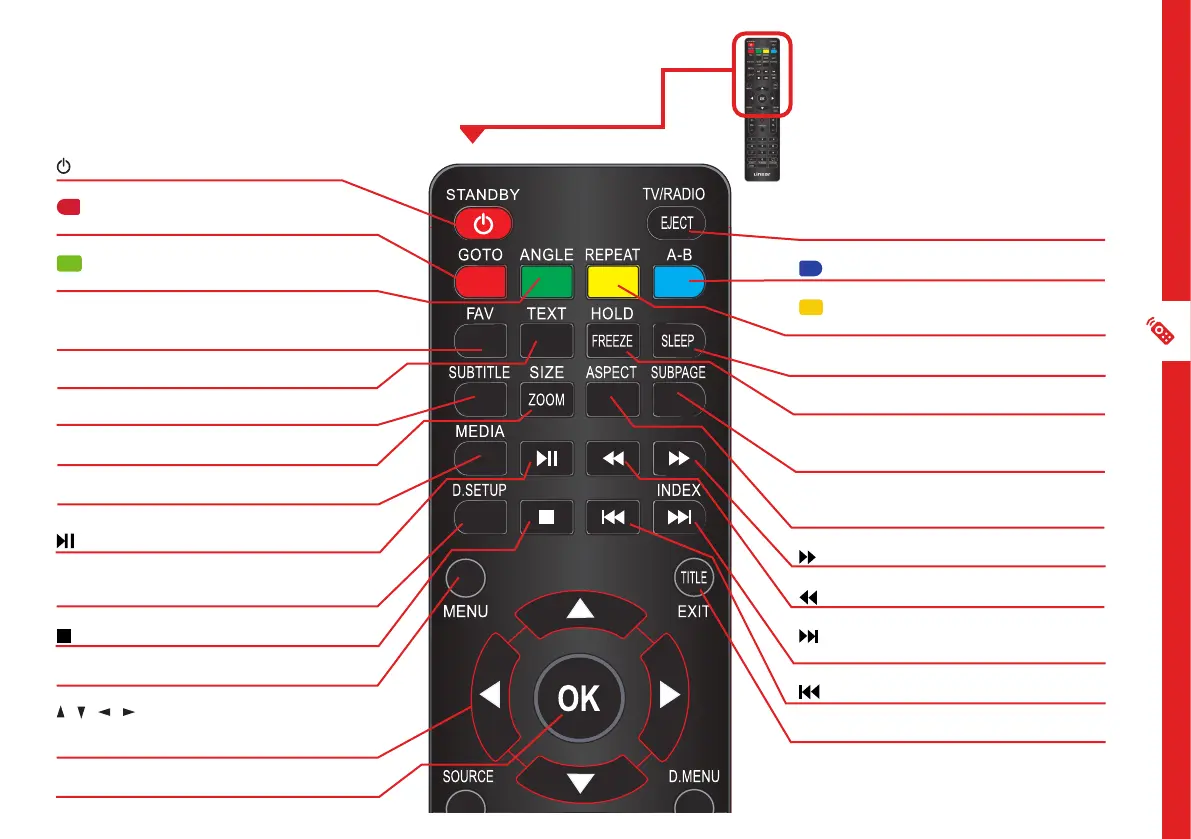
STANDBY: Switch the TV to On or Standby.
/GOTO: Jump to a different chapter of the
DVD.
/ANGLE: View DVD playback from different
angles, if the DVD has this feature.
FAV: Press to display your favourite program in
DTV mode.
TEXT: Switch between TV and Teletext mode.**
SUBTITLE: Enable/disable subtitles.
SIZE/ZOOM: Change the picture size.
MEDIA: Select USB mode.
: PLAY/PAUSE in TIMESHIFT and USB mode.
REC/D.SETUP: Record program in DTV mode /
Display the main disc menu.
: Stop playback.
MENU: Display the main TV menu.
/ / / : Press the UP/DOWN/LEFT/RIGHT
buttons to navigate the on-screen menus and
adjust the system settings.
OK: Display the channels list (DTV).
Standard Remote
TV/RADIO / EJECT: Switch between TV or radio
/ Eject a disc (DVD).
/A-B: Repeat selected DVD scenes.
/REPEAT: Repeat playback of a selected
chapter, title, or the entire DVD.
SLEEP: Set the TV sleep timer.
FREEZE: Hold the picture temporarily.
SUBPAGE: Manually jump to the previous or
next subpage of Teletext.**
ASPECT: Change the size of the image on your
screen.
: Move fast forward.
: Move fast backward.
/INDEX: Play next file./ Display the recorded
programs list (DTV).
: Play the previous file.
TITLE/EXIT: Display the DVD title menu.



 To Next Page