Welcome
to
UoneI TrainMaster
o
:-- -- 01 :,'ollr purchase
. Tr. -nZvfastersystem,
"f':":1G11PLi
J
•
or the future
and Liontech.
The
Uonel
TrainMaster system
The basic lio el Train' laster system
consists of ·our com: nents: Power-
Master, Pox .erl-Iouse, Biz Red" con-
trol button, and
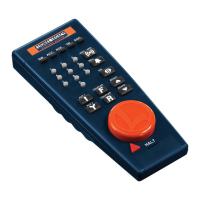
C-\B-l
controller.
CAB--l
iM
-
troller
p(TtJJerMast~
base
~ Big Red®switch
2
Lionel TrainMaster
Installing PowerMaster
and PowerHouse
Connect PowerHouse with PowerMaster by
inserting the power supply's connecting cable,
into PowerMaster's input jack.
Start by connecting your layout's track
wires to PowerMaster's binding posts
labeled "A" and "U." The A wire con-
nects to the center rail, the U to the outer
rail.Next, connect PowerHouse by insert-
ing its connector into PowerMaster's
input jack. Plug PowerHouse into a wall
outlet (120 volts, 60 cycles). Make sure
the switches on the side of Powerlvlas-
ter are set to
Run
and
Conventional.
Turn
on PowerHouse.
(Always
switch offPow-
erHouse any time you're not operating
your railroad.) ,
We recommend using PowerHouse to
electrify TrainMaster. However, any AC-
output transformer with a
maximum out-
put of
21
volts and a circuit breaker of 7
amps or less
will work. Purchase a Pow-
erMaster power adapter cable (part no.
6-01-2893-000,available at your Lionel
dealer). Connect the cable wire outfit-
ted with .a fuse to the A (or "hot") ter-
minal on your transformer; connect the
other wire to the U (or" common") ter-
minal. Plug the power adapter cable into
PowerMaster, then plug the transformer
into a conventional wall outlet (120volts,
Lionel TrainMaster
3


 To Next Page