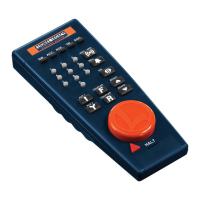
Throttle
Controls your locomo-
tive's speed. Turn the
throttle clockwise (right)
to increase locomotive
speed, counterclockwise
(left) to slow it down.
Whistle/Horn
Activates the whistle or
horn sound effect in any
Lionel locomotive. Press
WHISTLE/HORN to
beginthesound;releasethe
button to end it.
Bell
Starts or stops the tolling
bell in any Lionel Rail-
Sounds or Railsounds II-
equipped locomotive.
Press BELLto begin the
sound, again to stop it.
Direction
Changes the locomotive's
direction. Press DIREC-
TIO~. Your locomotive
"ill
sequence to the next
reverse-unit "direction"
(fon -ard, neutral, or
reverse).
Boost
Speeds up your locomo-
tive. BOOST provides
increased electricitywhile
you press the button.
Release it, and the power
returns to the previous
throttle level.
Brake
Slows your locomotive
6
BRAKE
~
wsnJHRN
[}[]
HALT
BELL
[!]
AUX1
IT]
DIR
ill]
BOOST
~
o
o
down. BRAKEdecreases
the electricity supplied to
the locomotive.Yourloco-
motive will eventually
come to a stop if you con-
tinue to depress BRAKE.
Release BRAKE,and the
train will return to itspre-
vious speed setting.
Halt
Provides an immediate,
emergency stop to all
operations. Since Power-
Master will automatically
shut down,
use
HALT
only
in emergency situations.
To
begin operating again,
readdress the track (TR
+
1)
and turn the throttle.
Track power-down
TellsPowerMastertocease
electrification of the
addressed track
only.
If
you're about to place a
locomotiveontrack,you'll
want that track "deacti-
vated." Press AUXI and
"0"
onthe 10-digitkeypad.
.This cuts power to the
addressed track. When
you're ready to begin
operations, turn the throt-
tle to reestablish power.
Note:
Press AUXI once
when using
"!-
single Pow-
erMaster. If you need to
"deactivate" the same
track later, hit "0" on the
Hi-digit keypad.
Stall
A Lionel locomotive's
Lionel TrainMaster
Lionel TrainMaster
7


 To Next Page