60 cycles) and set its throttle on maxi-
mum.
Warning: ensure your transformer
does not exceed a 21-volt AC maximum out-
put.
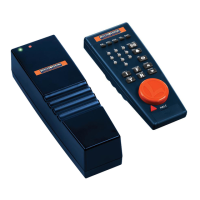
On top of PowerMaster are two
lights. When PowerMaster is receiving
electricity, the green light illuminates.
The red light flashes when PowerMaster
is receiving signals from CAB-I.
Many model railroaders use 'block con-
trol" to achieve multiple-train opera-
tion on their layouts. Block control
means track sections are electrically iso-
lated from each other, and receive power
ria a itch or an automated system
or
electrification like relays. If your rail-
road has block control, install Power-
_Iaster
bet-•.reen
the source electricity and
the block control panel.
Install four AA alkaline batteries in CAB-l.
Make sure the
"+"
ends match the symbols
inscribed in the battery compartmentbase.
BOOST always awakens a "sleeping"
CAB-I.) Turn the throttle clockwise (to
the right) and the train's speed
increases. Turn it counterclockwise (left)
and speed decreases. The dial has no
"off" position.
Using CAB-l
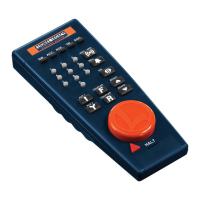
Today' modern railroads use handheld
remote controllers to switch locomotives
in yards. Yourlionel TrainMas-
ter CAB-l is based on this
real-lifetrend Press a but-
ton or turn the throt-
tle, and CAB-l
sends a radio sig-
nal to PowerMas-
ter. PowerMaster
then applies the appro-
priate amount of electricity to the track.
CAB-l's command buttons provide one-
touch control over many locomotive func-
tions: change direction, hit the brake,
boost your locomotive's speed, select
momentum or even switch to a differ-
ent track controlled by another Power-
Master.
Note:
many CAB-l buttons are
designed for use with future products.
They currently have no effect on oper-
ations.
Basic control
with one PowerMaster
To get CAB-l into action, install four
alkaline
AA batteries (not included).
Extend the telescoping antenna halfway
for small layouts, completely for larger
railroads. Press BOOST,turn the throt-
tle, and the handheld "wakes up." (It
"goes to sleep" after 30 seconds of inac-
tivity to extend battery life. Pressing
Address your track by
pressing TRACK ("TR")
and
"1/1
on the 10-digitkey-
pad. You only have to do
this
once.
This lets Power-
Master know you're ready.
Now every CAB-l action
button is ready to use.
TR
CJ
1
o
4
Lionel TrainMaster
Lionel TrainMaster
5


 To Next Page