23
www.LiteGait.com
1-800-332-9255
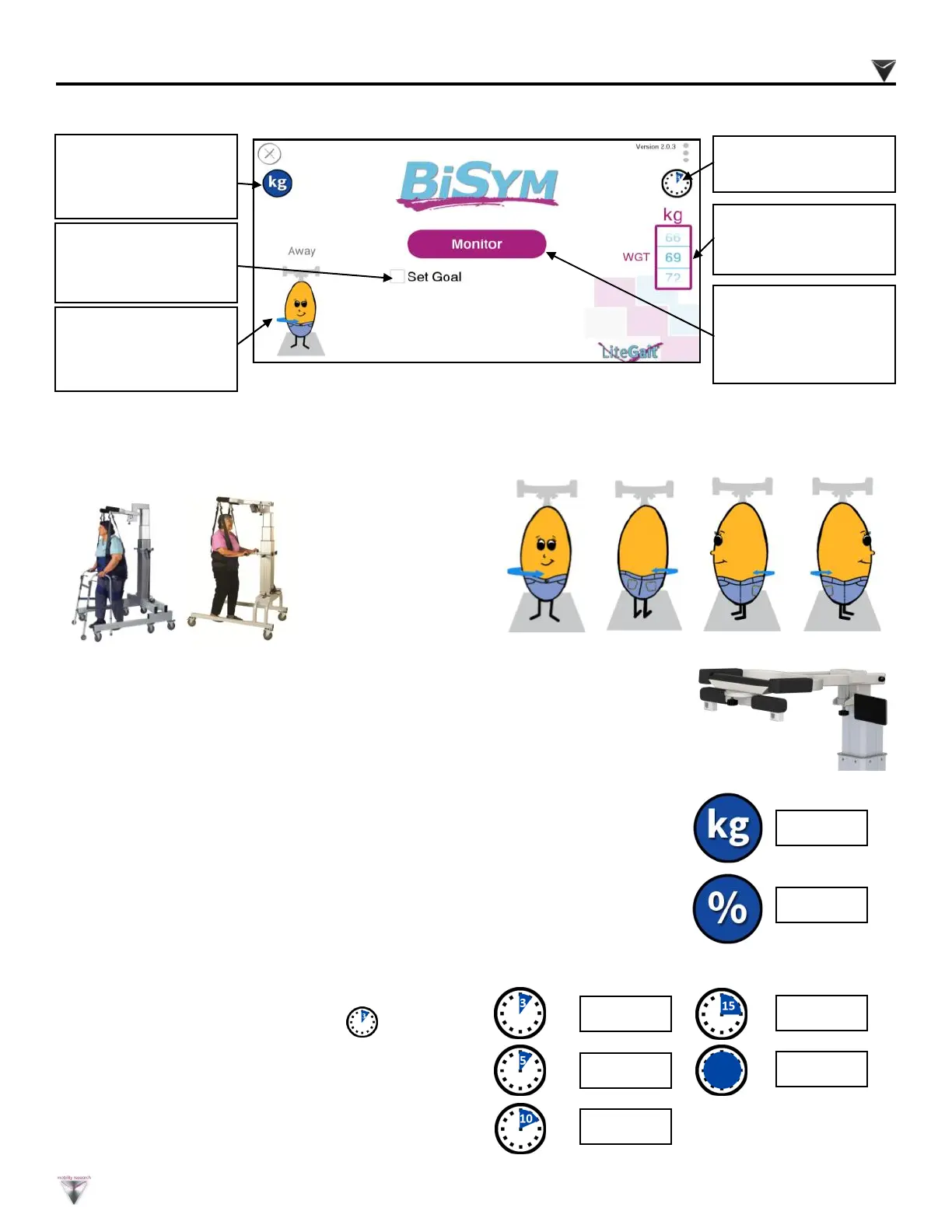
Click on the character to change the orientation
relative to LiteGait
®
.
PATIENT ORIENTATION
STARTING Optional BISYM Bluetooth (if so equipped)
Set Patient
Orientation
(SEE BELOW)
Record - Generate
goals, patient feed
back and reports
Monitor - Provides
live feedback of
LiteGait
®
support.
D i s p l ay su pp o r t
weight (lbs or kgs) or
% (See Below).
Time Duration
(See Below)
DISPLAY UNITS
TIME DURATION
3 Min
5 Min
10 Min
15 Min
Unlimited
To set the max duration of data
collection session, press the icon.
Time countdown upon initiation of the
monitor session. A lower value conser ves
tablet batter y and charge
Display the values of support provided by the LiteGait
®
in the
selected weight units or a percentage of the patients body weight.
Toggle weight or percentage by pressing the blue circle icon on the
display.
Weight
Percent
Patient weight in lbs
or kgs.
Front Back Side* Side*
*If your LiteGait
®
includes the optional Integrated FreeDome yoke, the
BiSym also allows for measuring in the side stepping position. Side
stepping measurements are displayed as total weight only.
Using Your LiteGait®


 To Next Page