24
www.LiteGait.com
1-800-332-9255
Using Your LiteGait®
SET GOAL (WEIGHT / PERCENTAGE)
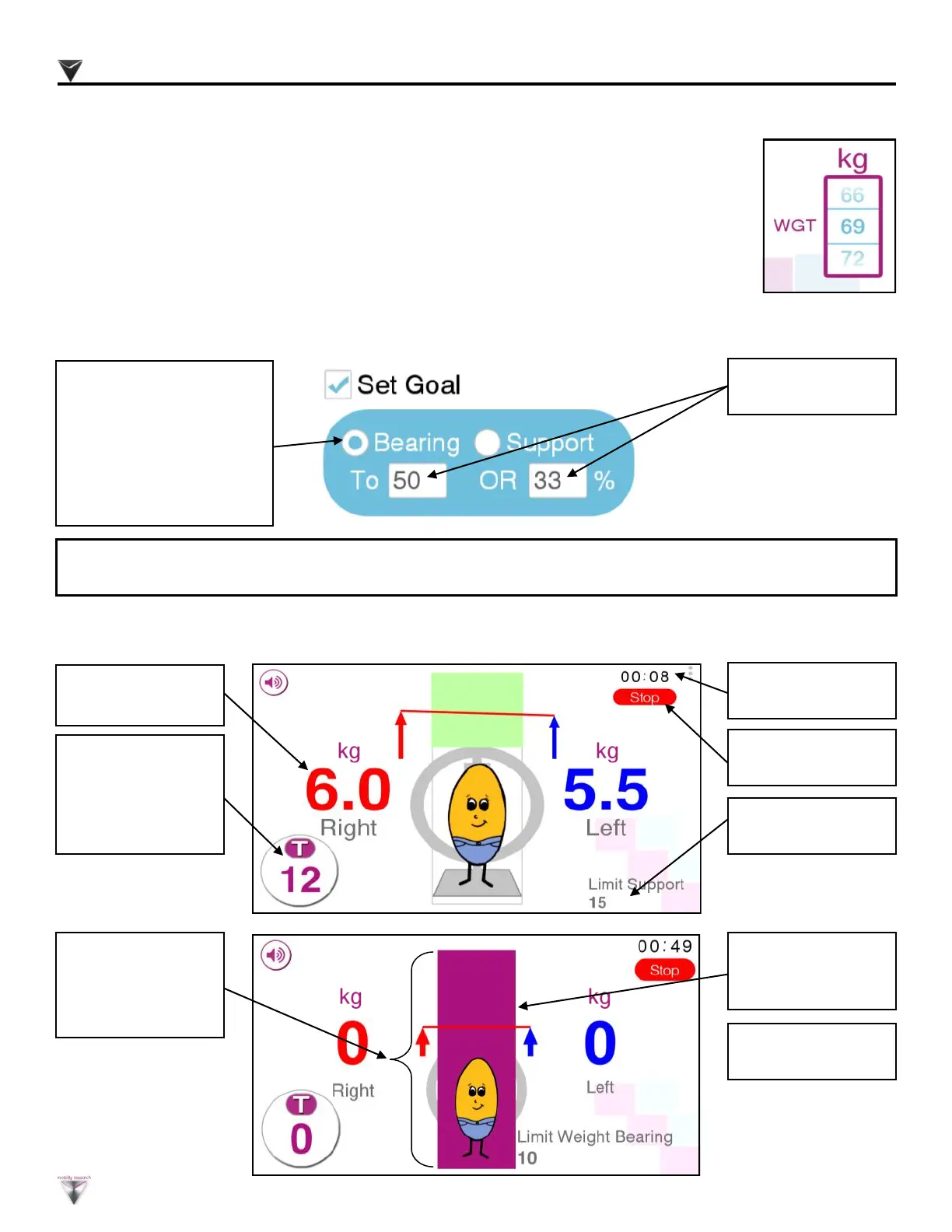
Enter goal value or
percent
If goal is to:
Limit patient’s weight
bearing, select “Bearing”
Limit support from,
LiteGait
®
, select
“Support”
PATIENT FEEBACK
Right Support in RED;
Left Support in BLUE
Total T (Right + Left)
Support. Click Circle
to switch value to the
difference D (Right -
Left)
Elapsed session time
shown in seconds.
Press Stop to end
session.
Set Goal is listed in
bottom right corner.
Green bar indicates
set goal is being met.
Fuchsia bar indicates
set goal is not being
met.
Bar increase and
decreases with the
change of the support
from patient.
SET USER WEIGHT
Set user’s weight. Slide scale up or down to adjust scale . Weight defaults at
150lbs / 69kg.
If a weight goal is set, adjusting the patient weight will cause the percentage goal to adjust. If a percentage goal is set, adjusting
patient weight will cause weight goal to adjust.
kg
kg
kg


 To Next Page