25
www.LiteGait.com
1-800-332-9255
Using Your LiteGait®
BiSym TABLET HOLDER
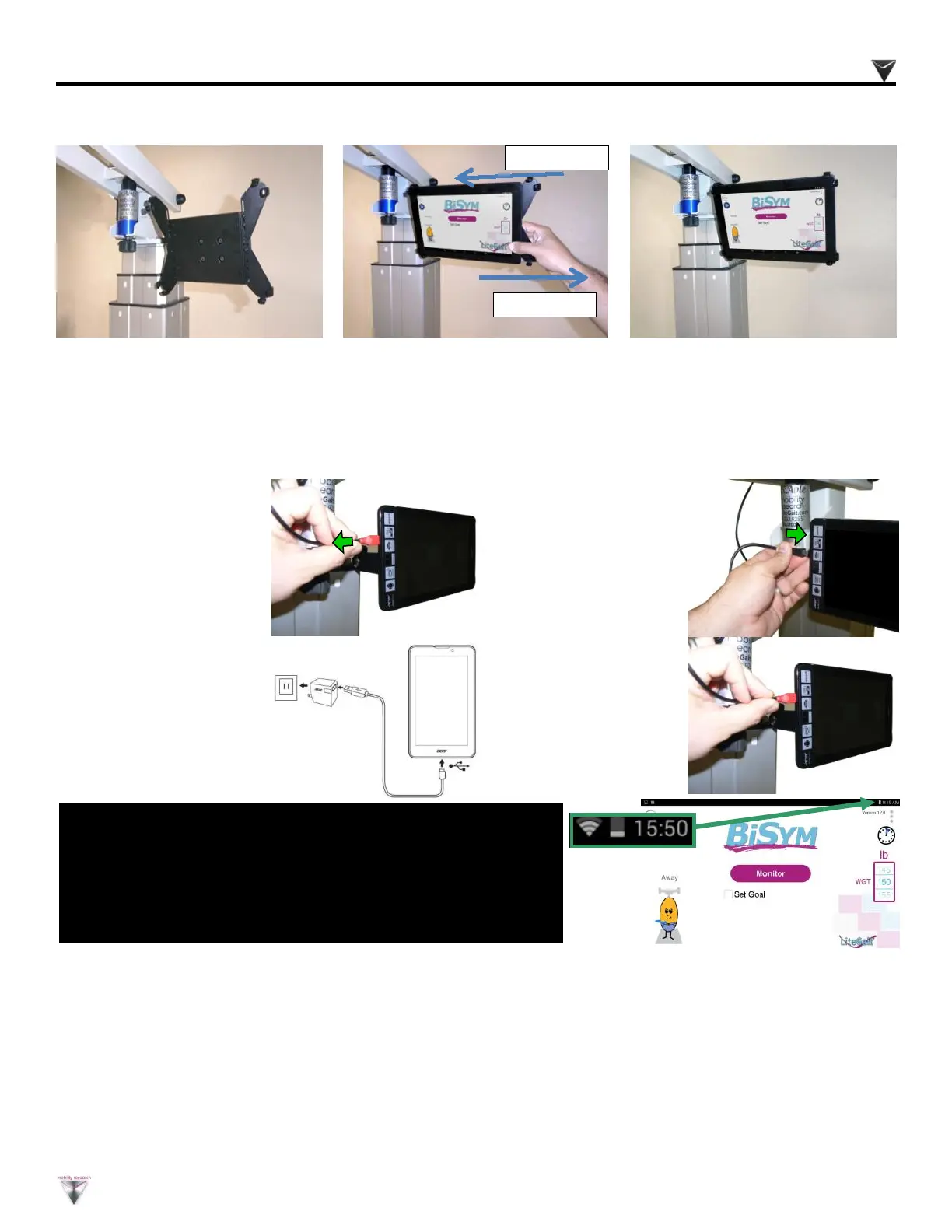
1. Disco n nect the
m i c r o U S B
instrumentation cable
from the micro USB
port on the left of
the display.
2. Connect charging
micro USB cable to
micro USB port on
display.
CHARGING BISYM BATTERY / DISPLAY
3. Connect charging
ca b l e t o P C or
charging or wall USB
charger.
NOTE :
BiSy m disp lay will requ ire routine ch argin g. Mon itor the
di spl ay b atte r y using the batte r y indic ator in the t op ri ght
hand corner of th e di spl ay. Conn ect char ging c able as
need ed.
4. Reconnect charging
m i c r o U S B
instrumentation cable
to display.
Slide Holder
Insert tablet
1 . I f a p p l i c a b l e , s e e
instructions to install tablet
holder to LiteGait.
2.Insert edge of tablet into
holder while sliding out
opposite edge of holder
3.Insert edge of tablet into
holder while sliding out
opposite edge of holder


 To Next Page