Remote Control
6
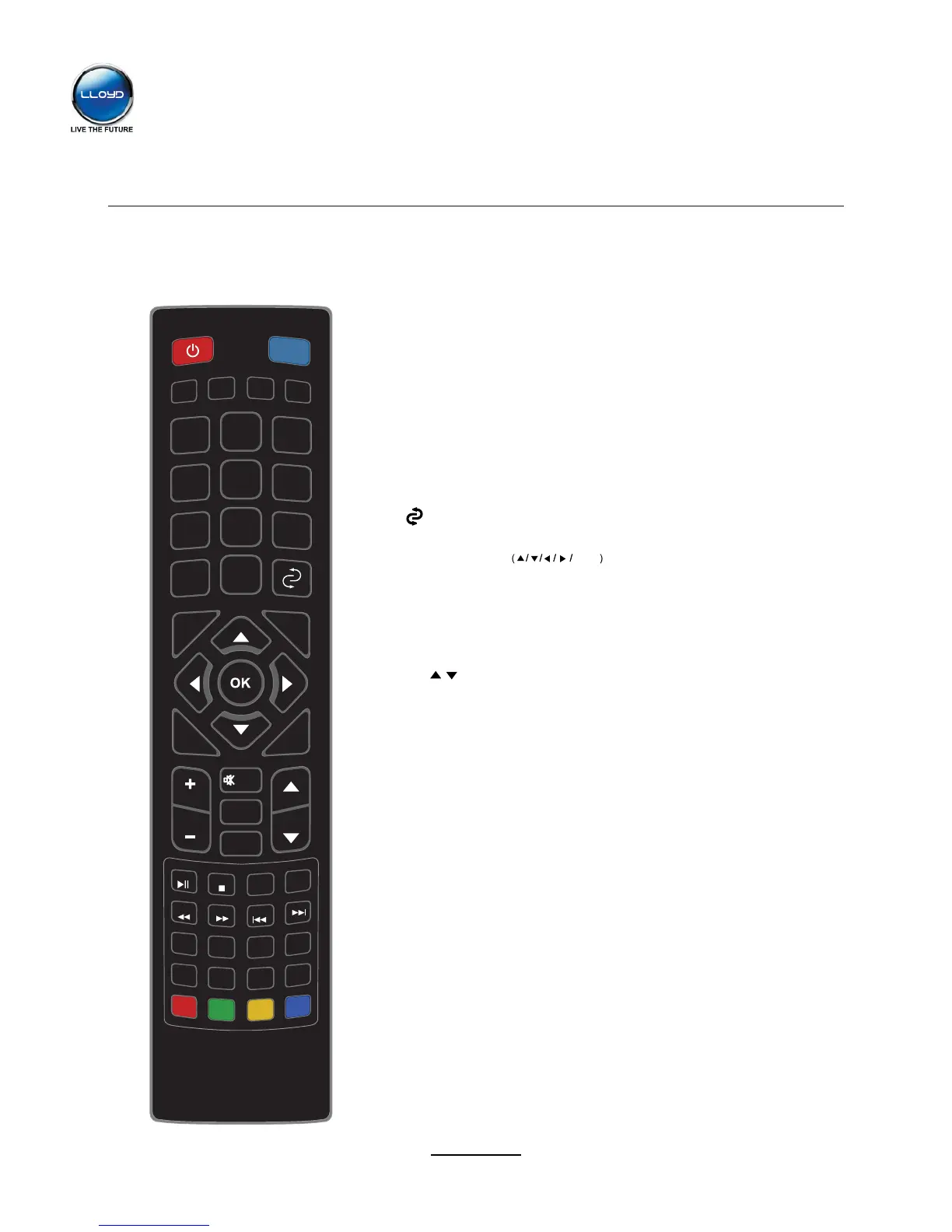
The remote control is using Infra-Red (IR). Point it towards the front of the LED TV. The remote
control may not work correctly if it is operated out of range or out of angle.
POWER: Turn the TV on/standby.
MUTE: Press to mute the sound, press again or press
VOL+ to unmute.
AUTO: Auto adjust in the PC mode.
PICTURE: Select the picture mode.
SOUND: Select the sound mode.
SLEEP: Standby timer.
NUMBER BUTTONS
Press 0-9 to select a TV channel directly when you
are watching TV.
: Return to the previous channel viewed.
INPUT: Press to display the input source menu.
MENU: System setup menu.
EXIT: Exit the OSD menu.
DISPLAY: Press to display the current mode’s information.
Allows you to navigate the on-screen menus and adjust the
system settings to your preference.
CURSOR KEYS OK
CH / : Scan through channels.
VOL+/-: Adjust the volume.
PICTURE
SOUND
DISPLAY
SLEEP
INPUT
TV/TXT
HOLD
NICAM
INDEX
1
2
3
4
5
6
7
8
9
0
VOL CH
MUTE
AUTO
MENU
SUBPAGE
SIZE
REVEAL
ROOT
REPEAT A-B
GOTO
FAV
FAV- FAV +
ASPECT
EXIT


 To Next Page