16
1
2
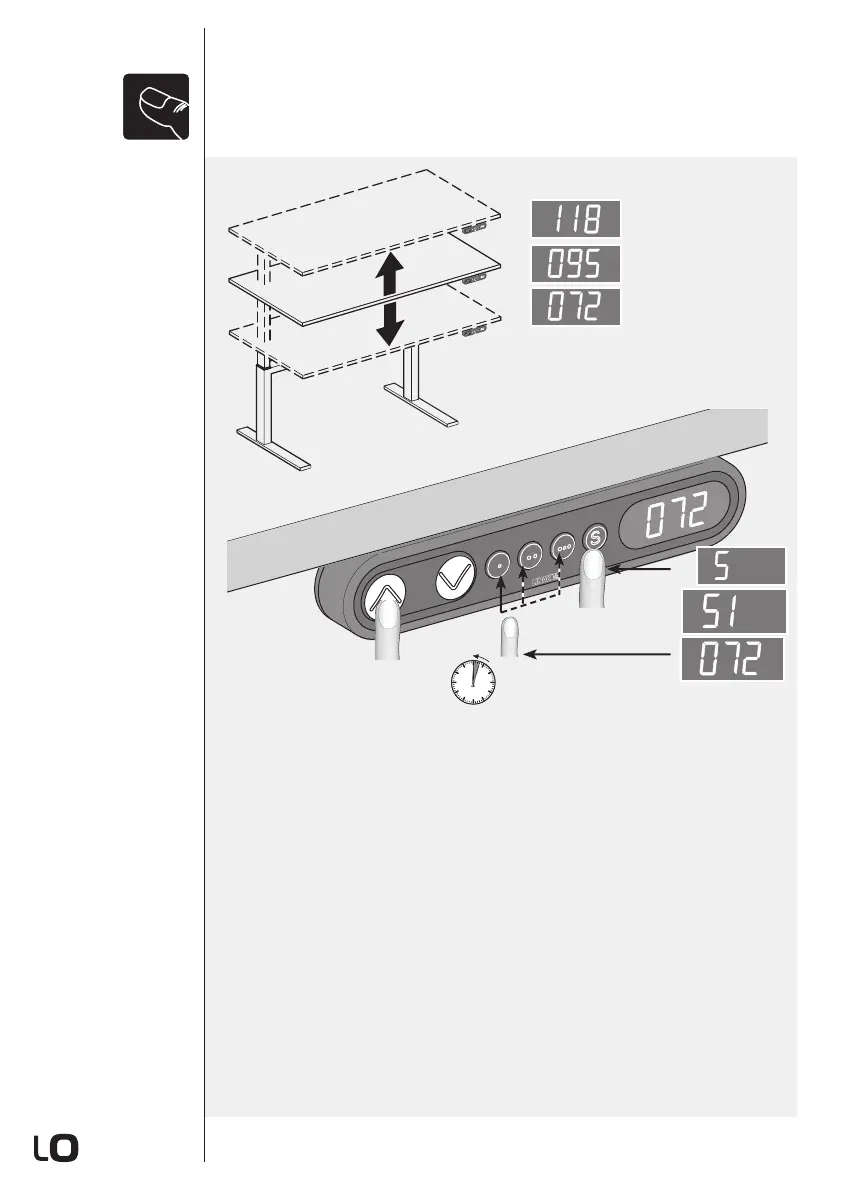
1 Mittels Antrieb "Auf/Ab" zur gewünschten Höhe fahren.
2 Speichertaste "S" drücken. Im Display erscheint "S".
3 Innerhalb von 3 Sekunden entsprechende Positionstaste drücken, auf
welcher die eingestellte Höhe gespeichert werden soll.
1 Au moyen de la commande "montée/descente", manoeuvrez le plateau à la haueur
de votre choix.
2 Pour enregistrer la position, pressez la touche "S".
3 Dans les 3 secondes, pressez la touche de positionnement correspondante,
afin d’enregistrer la hauteur de votre choix.
1 Con i comandi "su/giú" portare il tavolo all‘altezza desiderata.
2 Premere il tasto di memorizzazione "S" per salvare la posizione.
3 Entro 3 secondi, premere il corrispondente tasto di posizione su cui l‘altezza
impo-stata deve essere memorizzata.
1 Use the "Up/Down" buttons to set the desired height.
2 Press the "S" store button. The display reads "S".
3 To store the set height, press the position button within 3 seconds.
3
cm
cm
cm
cm
<3 sec
Speichern einer
Position
Mémorisation d'une
position
Memorizzazione di
una posizione
Storing a position


 To Next Page