3
LOADRITE™ LP950 Printer User Guide
2.2 PAPER ROLL REPLACEMENT
IMPORTANT
Do not pull the paper roll backwards through the printer
mechanism as this will cause irreparable damage!
The Loadrite Printer uses standard 57mm wide paper; either plain
or 2-layer NCR - if a duplicate copy is required.
The maximum roll diameter in either case is 57mm.
To replace the paper roll:
1. Open the hinged lid by springing the plastic clip and lift the lid
wide open.
2. Remove the short length of paper remaining in the printing
mechanism by:
a) Using the Paper Feed button, or
b) Using the manual paper feed wheel, or
c) Gently pulling the paper through the mechanism by
hand, in the Normal direction.
3. Remove the old roll core from the holding fingers and insert
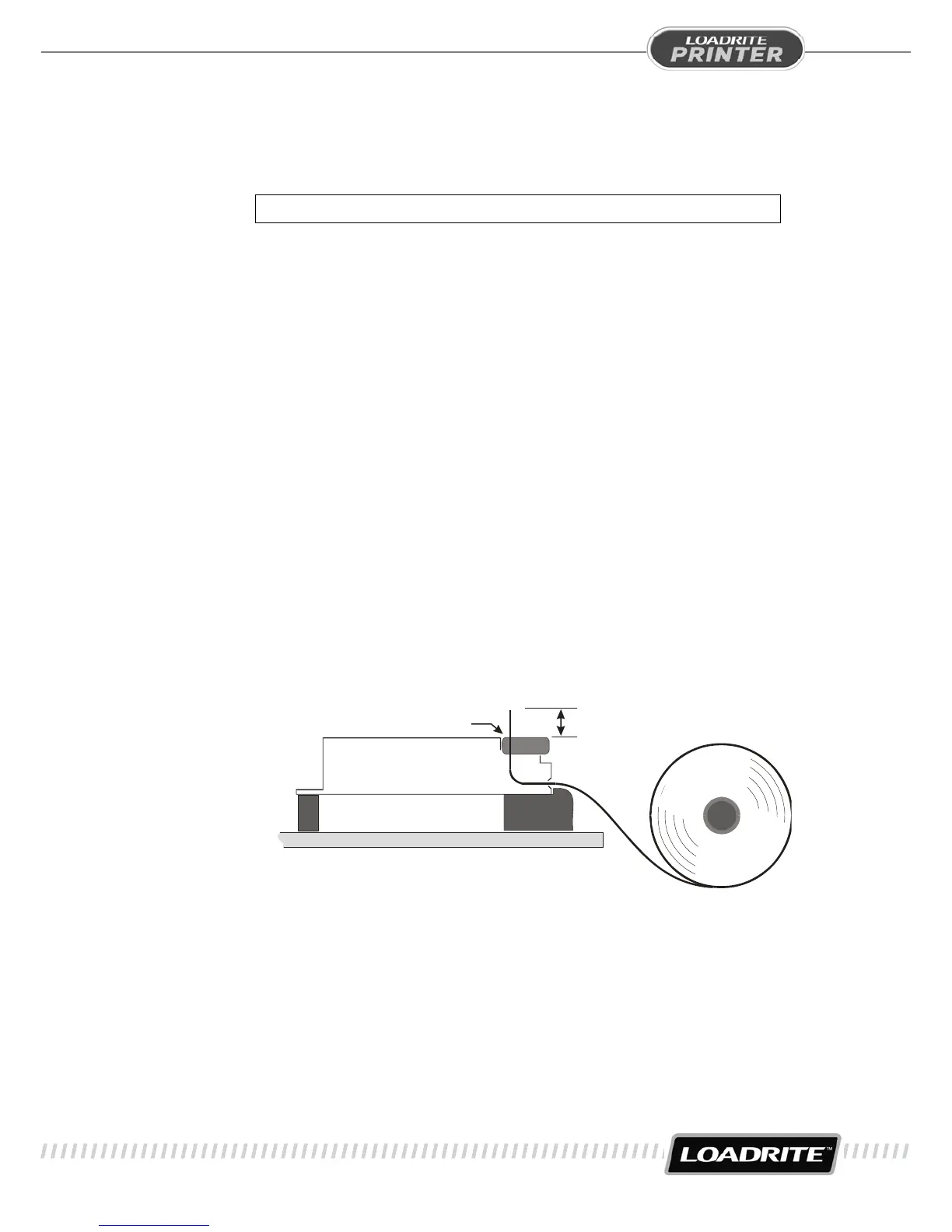
the new roll with the paper direction as shown in the diagram.
PAPER LOADING PATH
FEED THROUGH
APPROX 6mm
RIBBON
CASSETTE
4. Free the end of the new paper roll, checking that the end is
cut reasonably square and is free from irregular or jagged
tears. If needed, trim the end with scissors.
5. Take the free end of the paper and gently push it over the
plastic ramp and into the mouth of the printer.


 To Next Page