Player!Settings!
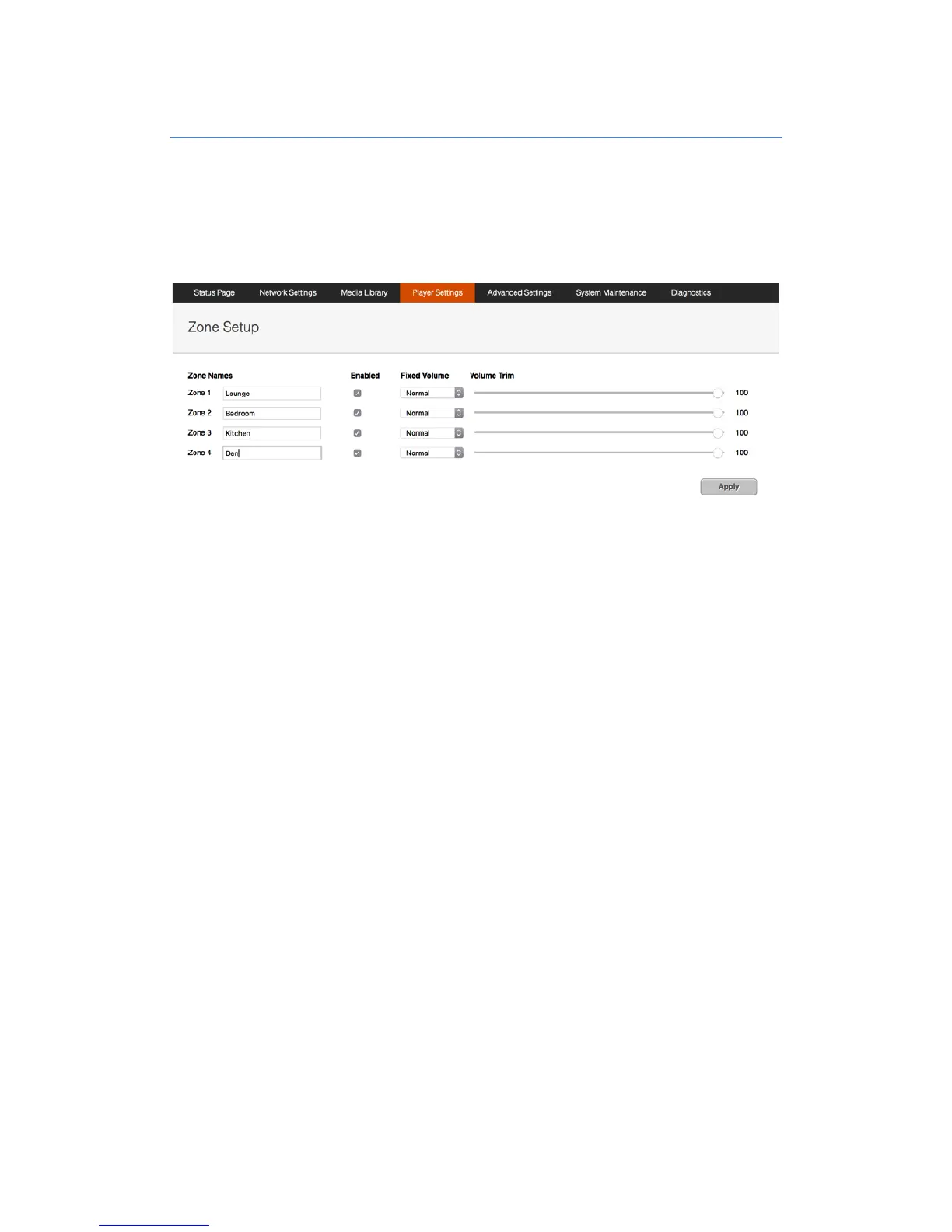
To change the name of any of the players for the Lode server, visit the “Player Settings”
section of the web console.
Here you can give each player a unique name such as “Living Room’, or ”Kitchen”, for
example.
Within the Player Settings area, you can also choose to enable or disable zones as required.
Fixed Volume Settings
There are 3 volume options in Lode:
• Normal – Variable volume controllable by all apps.
• Fixed – The volume of the Lode zone is fixed (can be combined with volume trim).
The default fixes the volume to 100% and disables the volume control in apps.
• Passthrough – This fixes the Lode zone volume to 100% (can be combined with
volume trim). Only with pass through the volume control is not disabled in Lode apps
and Lode will pass the volume control feedback back to a control system. This option
could be used to control a local AVR volume that Lode is connected to.
Warning: Setting the volume to fixed or passthrough will set the volume at 100% on the Lode
Server. Please make sure that the pre-amp is turned down before changing this setting
Volume Trim
This feature really exists to protect any equipment after Lode in the audio chain. If the Lode
zone volume is trimmed to 60%, volume control within Lode will now be between 0% and
60%.


 To Next Page