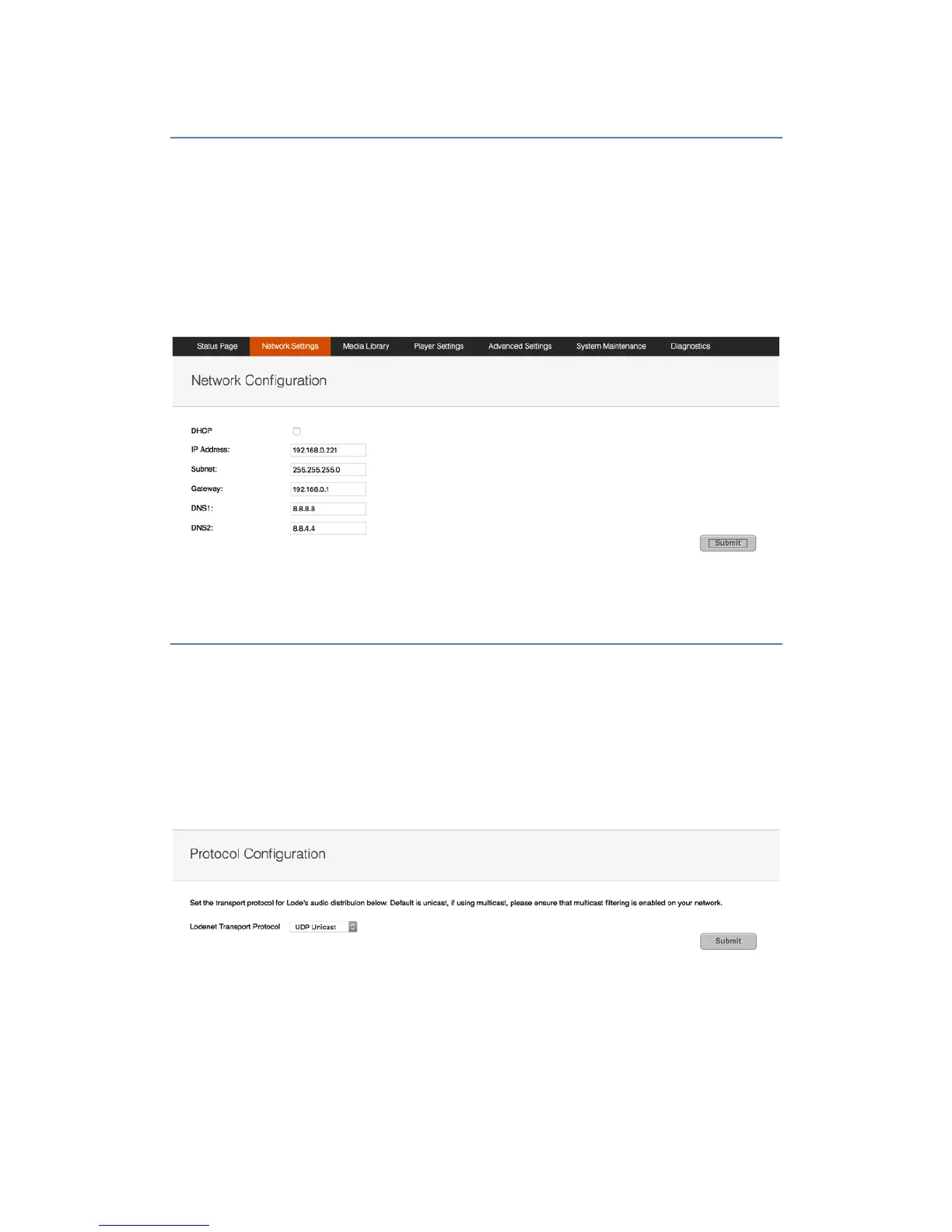
Change'Network'Settings!!
To change network settings, simply visit the “Network Settings” section of the web console.
Here you can set the unit’s IP address or confirm it’s configuration for DHCP.
If you are using a control system to control Lode, then you must either statically assign an IP
address to the unit or use IP allocation rules within the DHCP server to ensure that the unit
has a static IP address. This is required, as the set-up of the driver requires pointing the
module at the IP address of the Lode Server.
!
LODENET$Protocol$Configuration!
By default LODENET uses UDP Unicast for synchronizing audio streams, which will support
up to 64 zones on a network. This can be changed to UDP Multicast mode to enable support
for up to 256 zones.
Multicast filtering must be enabled on the VLAN for this to function correctly.
To change the LODENET Protocol, visit the “Network Settings” section of the web console.


 To Next Page