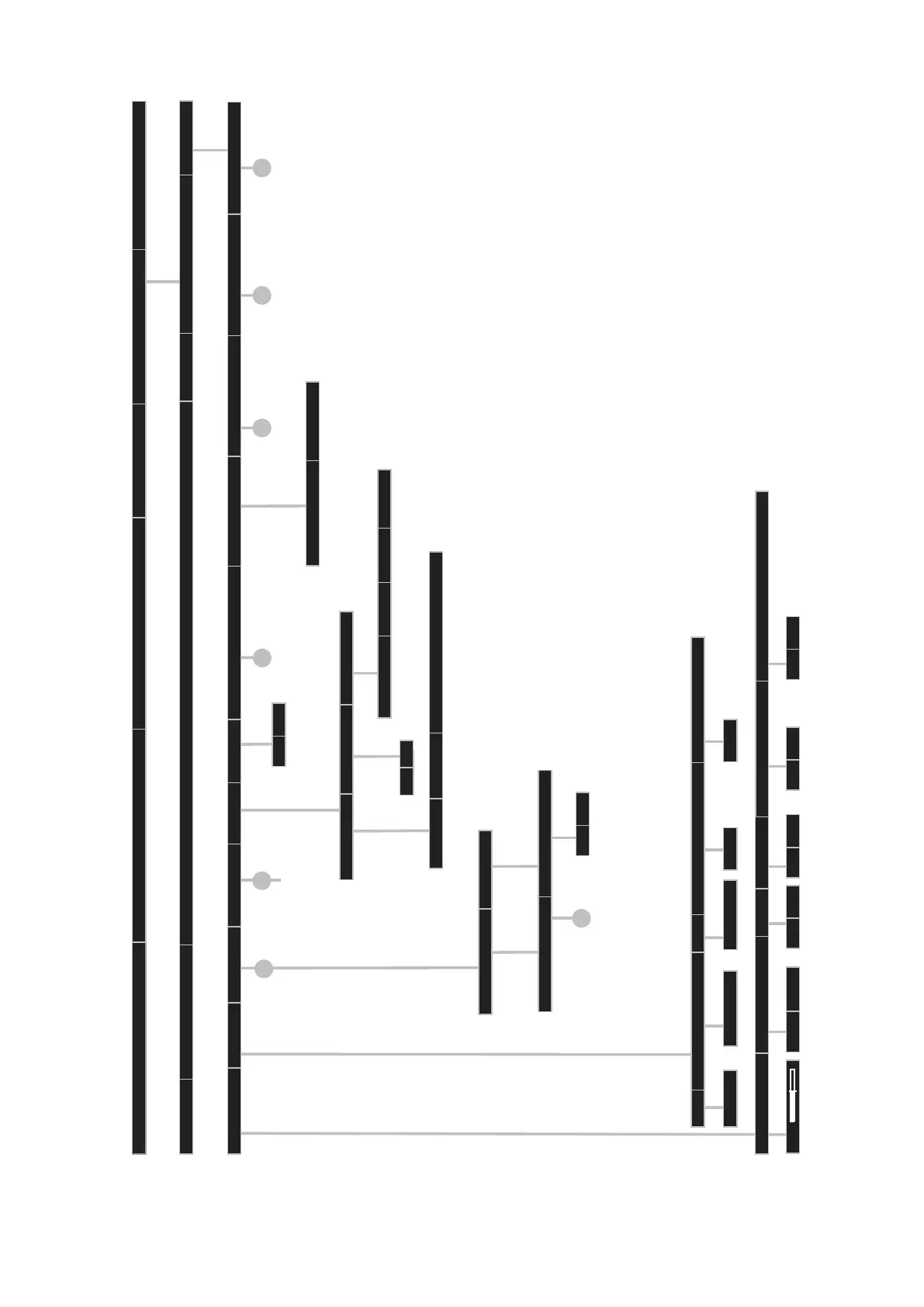
TV Menu Page 6
dependent on the integrated features of TV set, of soft ware version and on the selected station menu points can be cancelled or be changed
Picture
Sound
Recording
Connections
Stations
Parental lock
Timer functions
Language
Energy efficiency
Miscellaneous
OK
On-screen displays
Time and date
Software update
Western European
Polish
Standard
Greek
Time
Deviation from Universal Time
Datum
Beginning of daylight-saving time
End of daylight-saving time
dd.mm
dd.mm
dd.mm.yyyy
+xx hour(s)
hh:mm:ss
On-screen display time
7 sec
On-screen display position
bottom
top
Volume
yes
no
Automatic info
CA module: .........
Menu from CA module
OK
OK
Subtitle mode
Audio commentary
DVB character set
off
Subtitle off
Subtitle on
Subtitle on, preferred for impaired hearing
Automatic hint after switch to HDMI
Permanent clock display
off
on
SOFTWARE UPDATE WIZARD
Current software package:
TV base software
DVB software
DVB bootloader
WiFi software
FRC software
MSP software
MPEG encoder software
Standby processor software
Vx.x.x.x
Vx.x.x.x
Vx.x.x.x
Vx.x.x.x
Vx.x.x.x
Vx.x.x.x
Vx.x.x.x
Vx.x.x.x
Vx.x.x.x
SOFTWARE UPDATE WIZARD
Software package: current Vx.x.x.x new Vx.x.x.x
OK
OK
on
off
yes
no
yes
no
DVB settings
Hbb TV mode
Format integrated hard disk
Check integrated hard disk
on
OK OK OK
Activate
Start behaviour of Hbb TV stations
Format external hard disk
Activate
Activate
Settings
CA module
Via USB storage device
Via the internet
start software update
OK
Standard teletext first
MediaText first
Feature of the TEXT key
Inform about new software
yes
no



 To Next Page