33
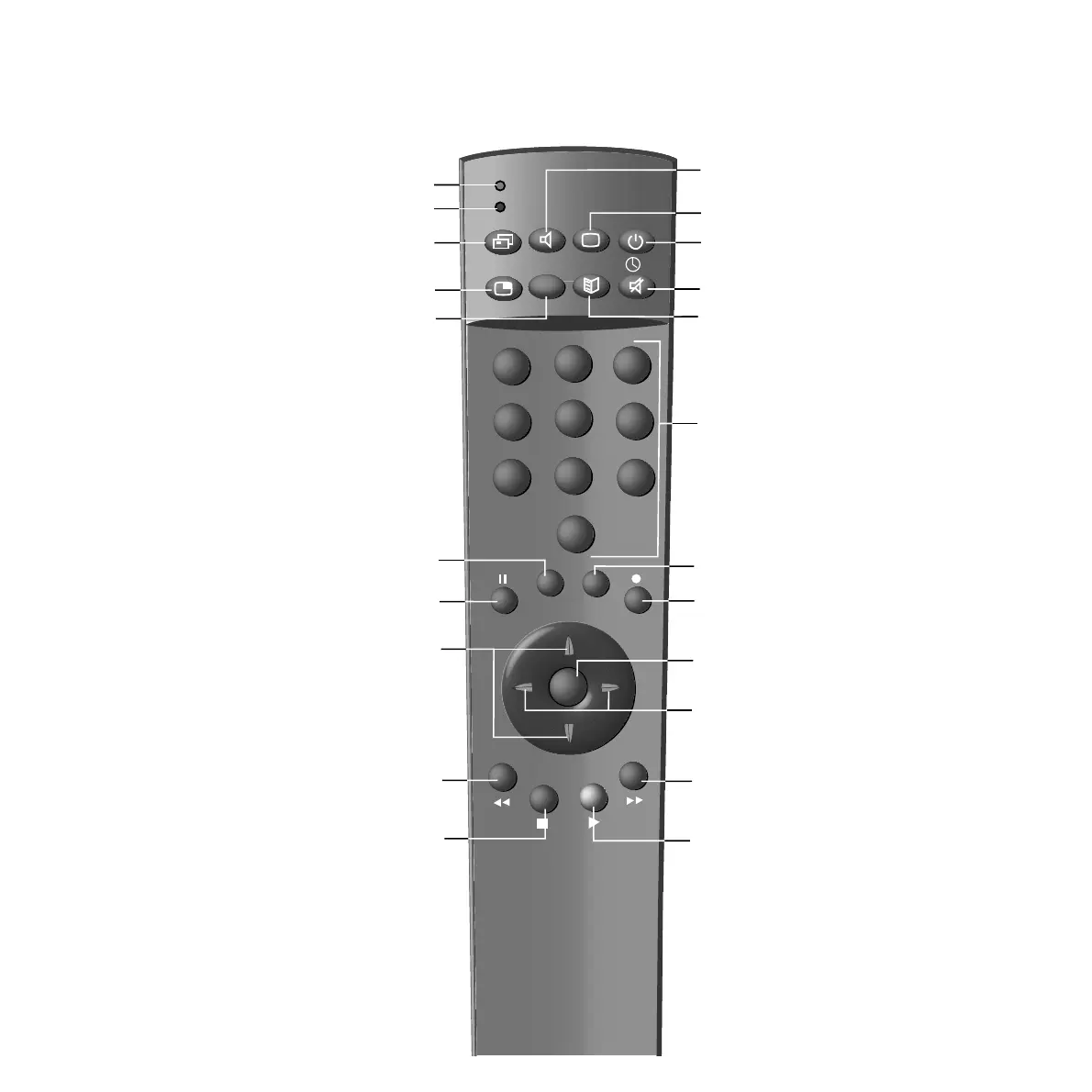
Remote control – TV functions
Control 100
0
1
2
3
4
5
6
7
8
9
M
E
OK
T
i
VTR
DVD
V
=
LP
000
SV
Adjust sound
✳
Adjust picture
✳
Switch on/off
– in standby mode
Sound off/on (Mute)
Programme info on/off
✳
To display channel, time
In a menu: to remove menu
Call up main information
Call programme overview
In a menu: confirm
TV: last channel
For Teletext: subject area
TV: to display/remove subtitles
For Teletext: Subject
TV: to call up normal settings
For Teletext: previous page
TV: to adjust picture format
For Teletext: next page
Select programme up/down
In a menu: select up/down
Teletext on/off
Call up menu
/in the menu: back
For video operation:
to display/remove video
operating strip
No function
Selection for operating
VCR/DVD/TV
Indicator: operate DVD
Indicator: Operate VCR
Set volume – / +
In a menu: select or adjust
left/right
To select channel directly
In a menu: to enter numbers
For Teletext: to enter page
number directly
✳
For Teletext. no function





 To Next Page