EasyManua.ls Logo

Logia LOGLP300 - Page 10

Logia LOGLP300
20 pages
Print Icon
To Next Page IconTo Next Page
To Previous Page IconTo Previous Page
Loading...
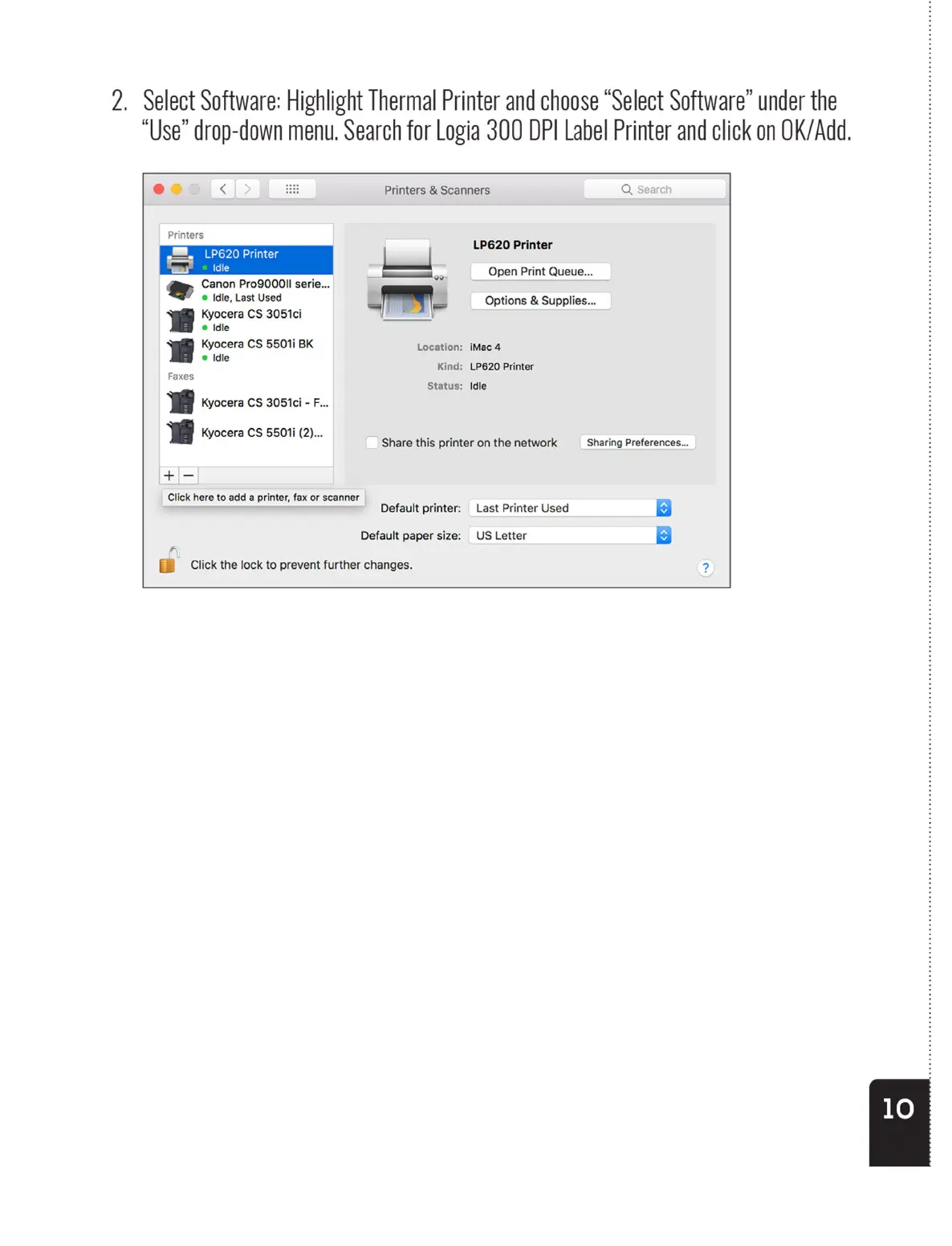
2.
Select
Software:
Highlight
Thermal
Printer
and
choose
“Select
Software”
under
the
“Use”
drop-down
menu.
Search
for
Logia
300
DPI
Label
Printer
and
click
on
OK/Add.
ee
<
Printers
Te
| |
bs
Idle
Canon
Pro900OII
serie...
©
Idle,
Last
Used
rrr
Kyocera
CS
3051ci
@
Idle
Kyocera
CS
5501i
BK
®@
Idle
B
Kyocera
CS
550i1i
(2)...
+—-
Click
here
to
add
a
printer,
fax
or
scanner
A
EE
Click
the
lock
to
prevent
further
changes.
Share
this
printer
on
the
network
Default
printer:
Default
paper
size:
Printers
&
Scanners
Qs
LP620
Printer
Open
Print
Queue...
Options
&
Supplies...
Location:
iMac
4
Kind:
LP620
Printer
Status:
Idle
Sharing
Preferences...
Last
Printer
Used
US
Letter
2.
Select
Software:
Highlight
Thermal
Printer
and
choose
“Select
Software”
under
the
“Use”
drop-down
menu.
Search
for
Logia
300
DPI
Label
Printer
and
click
on
OK/Add.
ee
<
Printers
Te
| |
bs
Idle
Canon
Pro900OII
serie...
©
Idle,
Last
Used
rrr
Kyocera
CS
3051ci
@
Idle
Kyocera
CS
5501i
BK
®@
Idle
B
Kyocera
CS
550i1i
(2)...
+—-
Click
here
to
add
a
printer,
fax
or
scanner
A
EE
Click
the
lock
to
prevent
further
changes.
Share
this
printer
on
the
network
Default
printer:
Default
paper
size:
Printers
&
Scanners
Qs
LP620
Printer
Open
Print
Queue...
Options
&
Supplies...
Location:
iMac
4
Kind:
LP620
Printer
Status:
Idle
Sharing
Preferences...
Last
Printer
Used
US
Letter
2.
Select
Software:
Highlight
Thermal
Printer
and
choose
“Select
Software”
under
the
“Use”
drop-down
menu.
Search
for
Logia
300
DPI
Label
Printer
and
click
on
OK/Add.
ee
<
Printers
Te
| |
bs
Idle
Canon
Pro900OII
serie...
©
Idle,
Last
Used
rrr
Kyocera
CS
3051ci
@
Idle
Kyocera
CS
5501i
BK
®@
Idle
B
Kyocera
CS
550i1i
(2)...
+—-
Click
here
to
add
a
printer,
fax
or
scanner
A
EE
Click
the
lock
to
prevent
further
changes.
Share
this
printer
on
the
network
Default
printer:
Default
paper
size:
Printers
&
Scanners
Qs
LP620
Printer
Open
Print
Queue...
Options
&
Supplies...
Location:
iMac
4
Kind:
LP620
Printer
Status:
Idle
Sharing
Preferences...
Last
Printer
Used
US
Letter