EasyManua.ls Logo

Logia LOGLP300 - Logia Printer LED Indicator Meanings; Interpreting Printer Status Lights

Logia LOGLP300
20 pages
Print Icon
To Next Page IconTo Next Page
To Previous Page IconTo Previous Page
Loading...
@
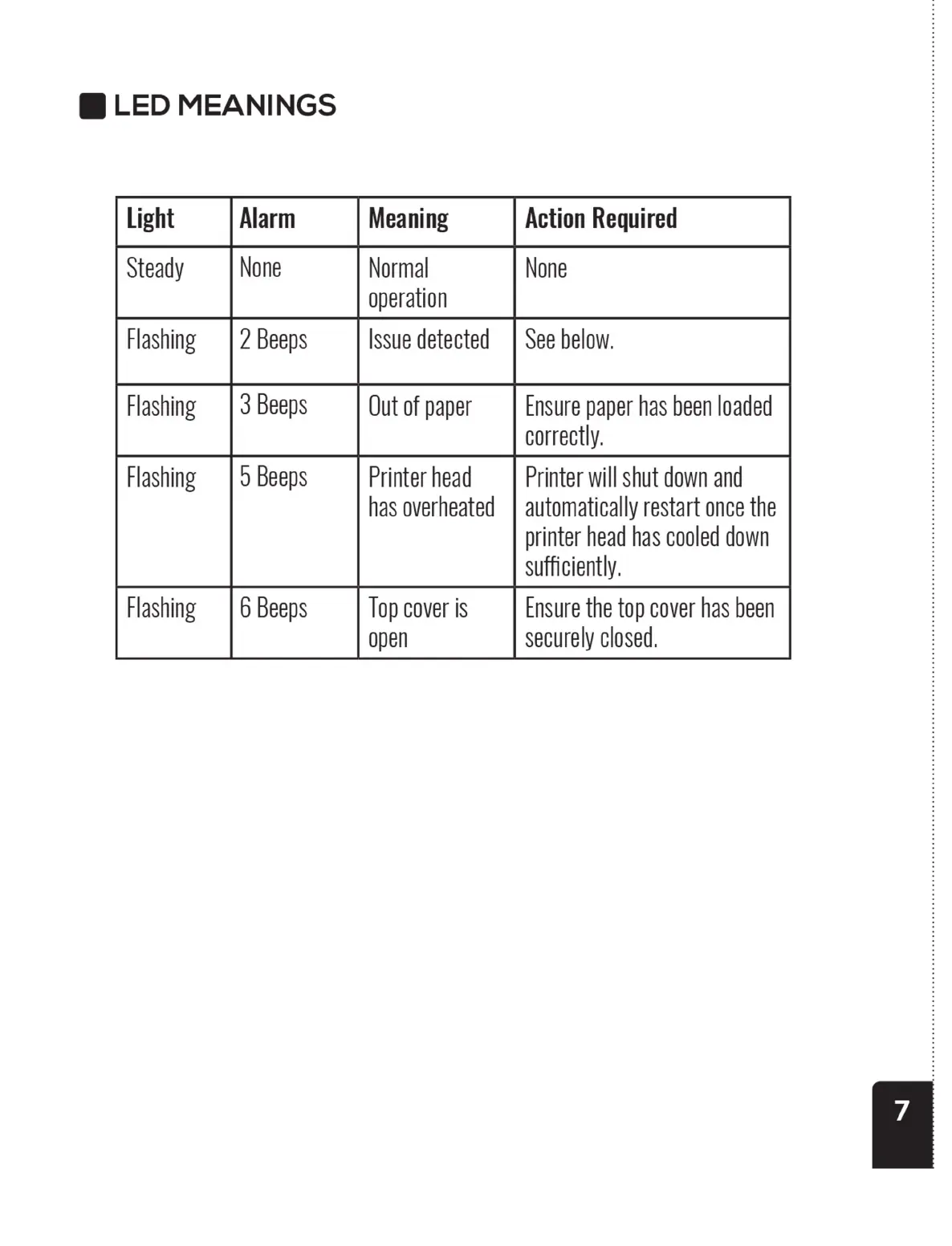
LED
MEANINGS
Light
Alarm
Meaning
Action
Required
Steady
None
Normal
None
operation
Flashing
|
2
Beeps
Issue
detected
|
See
below.
Flashing
|
3
Beeps
Out
of
paper
Ensure
paper
has
been
loaded
correctly.
Flashing
|
0
Beeps
Printer
head
Printer
will
shut
down
and
has
overheated
|
automatically
restart
once
the
printer
head
has
cooled
down
sufficiently.
Flashing
|
6
Beeps
Top
cover
is
Ensure
the
top
cover
has
been
open
securely
closed.
@
LED
MEANINGS
Light
Alarm
Meaning
Action
Required
Steady
None
Normal
None
operation
Flashing
|
2
Beeps
Issue
detected
|
See
below.
Flashing
|
3
Beeps
Out
of
paper
Ensure
paper
has
been
loaded
correctly.
Flashing
|
0
Beeps
Printer
head
Printer
will
shut
down
and
has
overheated
|
automatically
restart
once
the
printer
head
has
cooled
down
sufficiently.
Flashing
|
6
Beeps
Top
cover
is
Ensure
the
top
cover
has
been
open
securely
closed.
@
LED
MEANINGS
Light
Alarm
Meaning
Action
Required
Steady
None
Normal
None
operation
Flashing
|
2
Beeps
Issue
detected
|
See
below.
Flashing
|
3
Beeps
Out
of
paper
Ensure
paper
has
been
loaded
correctly.
Flashing
|
0
Beeps
Printer
head
Printer
will
shut
down
and
has
overheated
|
automatically
restart
once
the
printer
head
has
cooled
down
sufficiently.
Flashing
|
6
Beeps
Top
cover
is
Ensure
the
top
cover
has
been
open
securely
closed.