13
TEMPERATURE
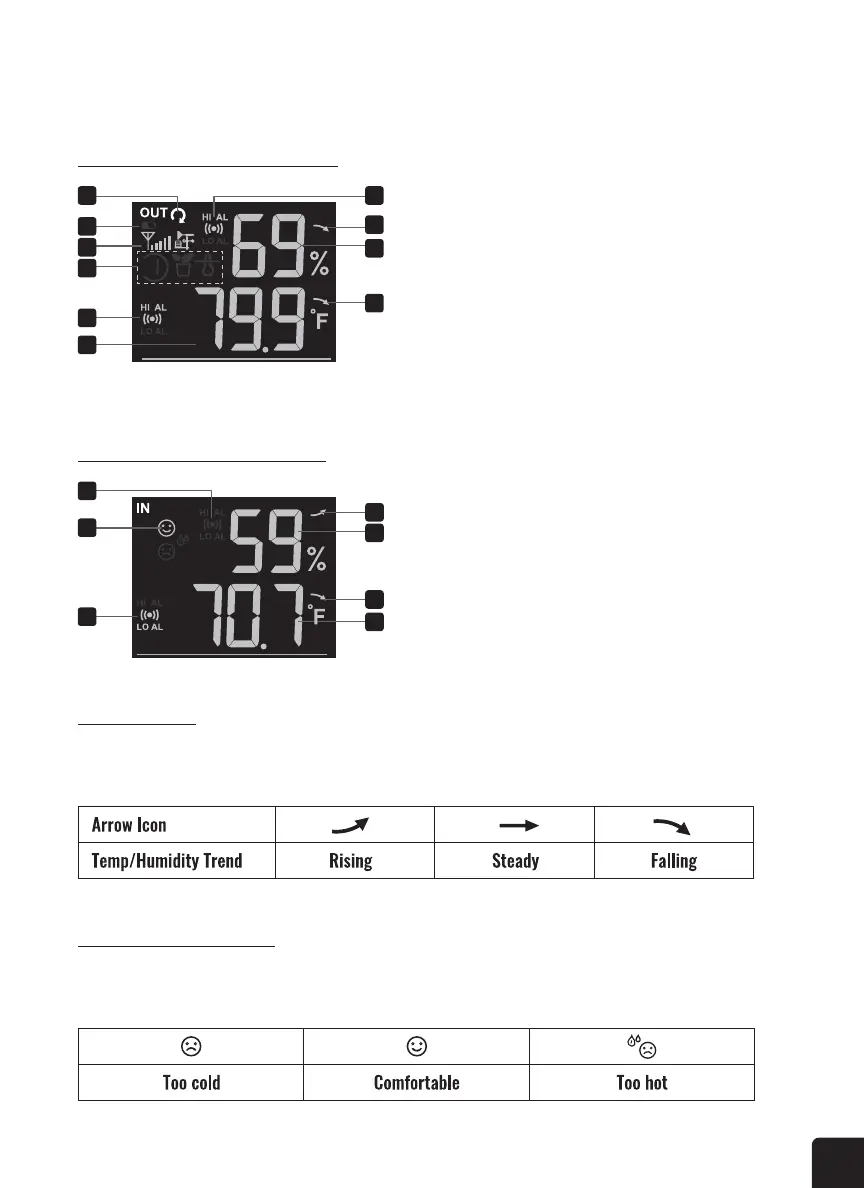
Outdoor Temp & Humidity Display
Indoor Temp & Humidity Display
1. Auto loop indicator
2. Low battery indicator
3. Signal strength indicator
4. CH indicator and sensor indicator
5. Temperature alert indicator
6. Temperature reading
7. Humidity alert indicator
8. Humidity trend
9. Humidity reading
10. Temperature trend
1. Humidity alert indicator
2. Comfort indication
3. Temperature alert indicator
4. Humidity trend
5. Humidity reading
6. Temperature trend
7. Temperature reading
1 7
8
9
10
2
3
4
5
6
1
4
5
6
7
2
3
Trend Indicator
Press the °C/°F button to switch between Celsius and Fahrenheit temperature measurements. The
arrows show the trend in changes to the temperature/humidity levels.
Indoor Comfort Indicator
The indoor comfort indicators display a pictorial representation based on the indoor air temperature and
humidity levels to determine the approximate comfort level.



 To Next Page