8
INSTALLATION INSTRUCTIONS
SETTING UP THE WIRELESS 7-IN-1 OUTDOOR SENSOR
The wireless 7-in-1 outdoor sensor measures wind speed, wind direction, rainfall, UV, light intensity,
temperature, and humidity for you.
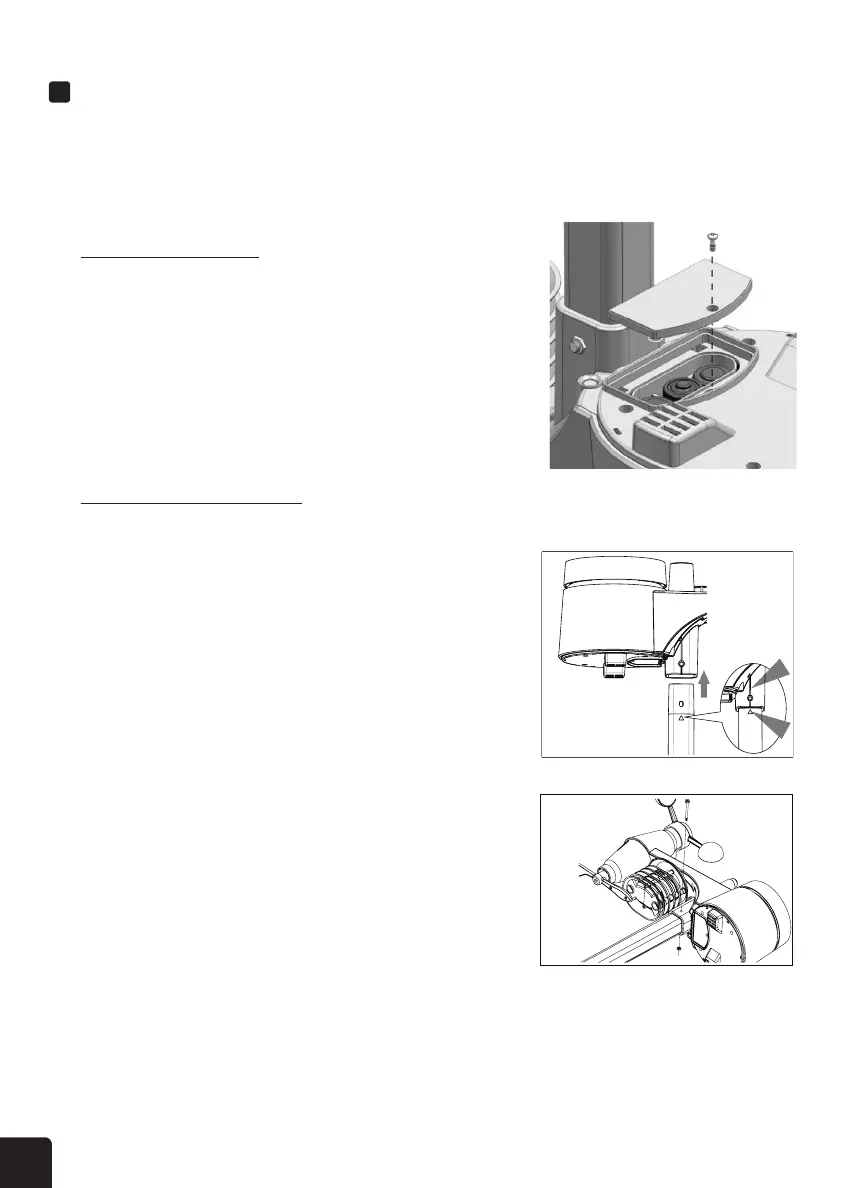
Installing the Batteries
1. Unscrew the battery door at the bottom of the 7-in-1 outdoor
sensor.
2. Insert three (3) AA batteries (not included) according to the
+/- polarity labeled in the compartment.
3. Screw the battery door back onto the compartment.
NOTE: The LED light will ash red every 12 seconds.
Mounting the Sensor on Pole
1. Pick a location for the 7-in-1 outdoor sensor that’s open with no obstructions.
2. Place the outdoor sensor over the top side of the mounting
pole (included). Make sure the square holes are aligned with
each other.
3. Insert the screw through the holes of the sensor and pole
then tighten the hexagonal nut onto the other end of the
screw. Use a screwdriver or wrench if needed.



 To Next Page