16
• RATE: current rainfall rate in the past hour
• HOURLY: total rainfall in the past hour
• DAILY: total rainfall since midnight
• WEEKLY: total rainfall for the current week
• MONTHLY: total rainfall since the beginning of the current month
• TOTAL: total rainfall since the last reset
Set the Rainfall Units
1. Press and hold the RAIN button for two (2) seconds to enter unit setting mode.
2. Press the UP or DOWN button to toggle the units of measure for rainfall between mm and in.
3. Press the RAIN button again to conrm and exit.
Reset the Rainfall Records
While in normal operating mode, press and hold the HISTORY button for eight (8) seconds to reset the
rainfall records.
NOTE: To ensure precise data, please reset the rainfall records whenever you move and reinstall
your wireless weather sensor to a dierent location.
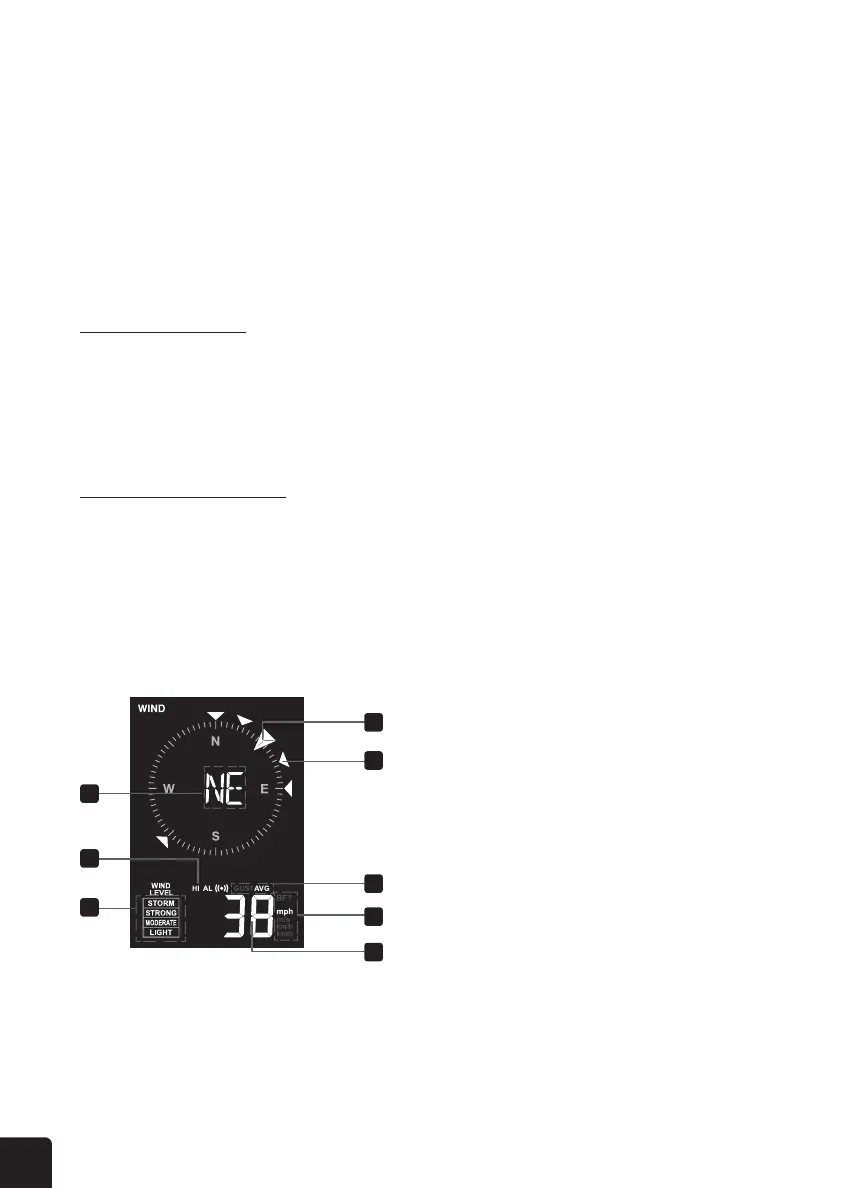
WIND
1
2
3
4
5
6
7
8
1. Wind direction reading
2. Wind alert indicator
3. Wind speed level
4. Current wind direction indicator
5. Wind direction indicators in last 5
minutes (max 6 indicator marks)
6. Gust or average wind speed indicator
7. BFT and Wind speed unit of measure
8. Wind speed reading



 To Next Page