GB
10
Preparation
1.
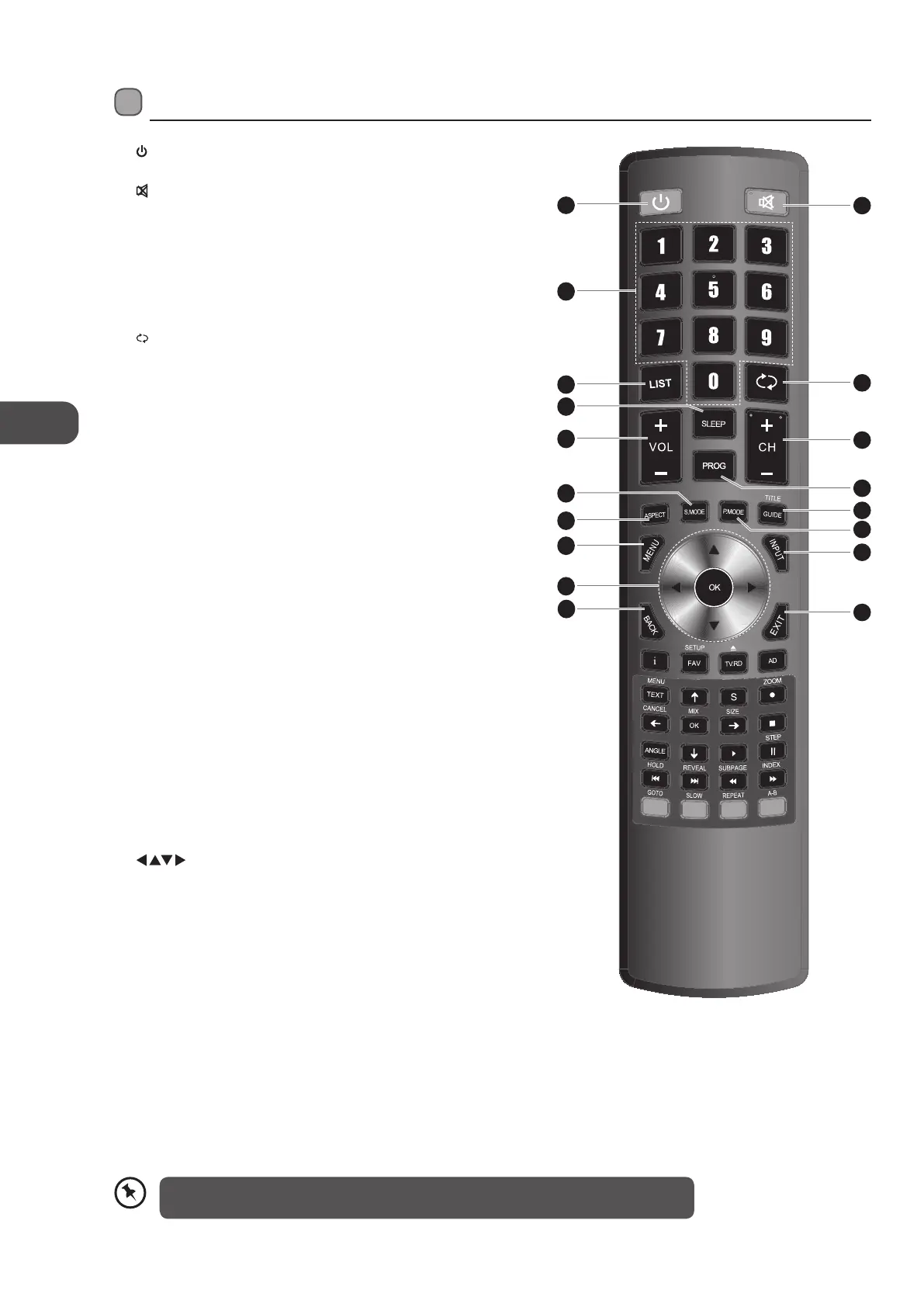
Switches the TV between on and standby mode.
2.
MUTE
Mutes and restores your TV sound.
3. 0-9 Number Button
Press to select a programme.
Select numbered items in a menu. (DVD mode)
4. LIST
Display the channel list. (ATV / DTV mode)
Display the text page on the teletext screen. (ATV mode)
5.
RECALL
Return to the previous viewing channel. (ATV / DTV mode)
Return to menu (DVD mode)
6. SLEEP
Sets the TV sleep timer: OFF / 10 / 20 / … / 180 / 240 min.
7. VOL + / –
Adjusts the volume.
8. CH + / –
Select a channel.
9. PROG
Display the channel edit menu. (ATV / DTV mode)
Programme the DVD. (DVD mode)
10. S.MODE
Select sound mode: Standard / Music / Movie / Sports / User.
11. ASPECT
Allows you to watch the screens in various formats: Auto / 4:3 /
16:9 / Zoom / Subtitle / Smart Zoom / Dot to Dot.
12. GUIDE
Displays the EPG electronic Programme guide. (DTV mode)
TITLE
Displays the DVD title content. (DVD mode)
13. P.MODE
Select picture mode: Standard / Mild / User / Dynamic.
14. MENU
Display the OSD (On Screen Display) menu.
15. INPUT
Select among the dierent input signal sources:
DTV / ATV / SCART / YPbPr / PC / HDMI1 / HDMI2 / AV / DMP
16.
Allows you to navigate the OSD menus and adjust the system
settings to your preference.
OK
Con€rm the selection in the OSD menus.
17. BACK
Return to the previous menu in the OSD menus.
18. Exit
Exit the OSD menu.
Remote Control
1
2
5
8
12
15
18
9
13
3
4
7
11
14
16
17
6
10
Please note that there are DVD mode functions on the remote control only operate on
TV models with a built-in DVD player.
L22LDIB11_IB_Running Change120222_Annie.indd 10 12年2月22日 下午3:46



 To Next Page