21
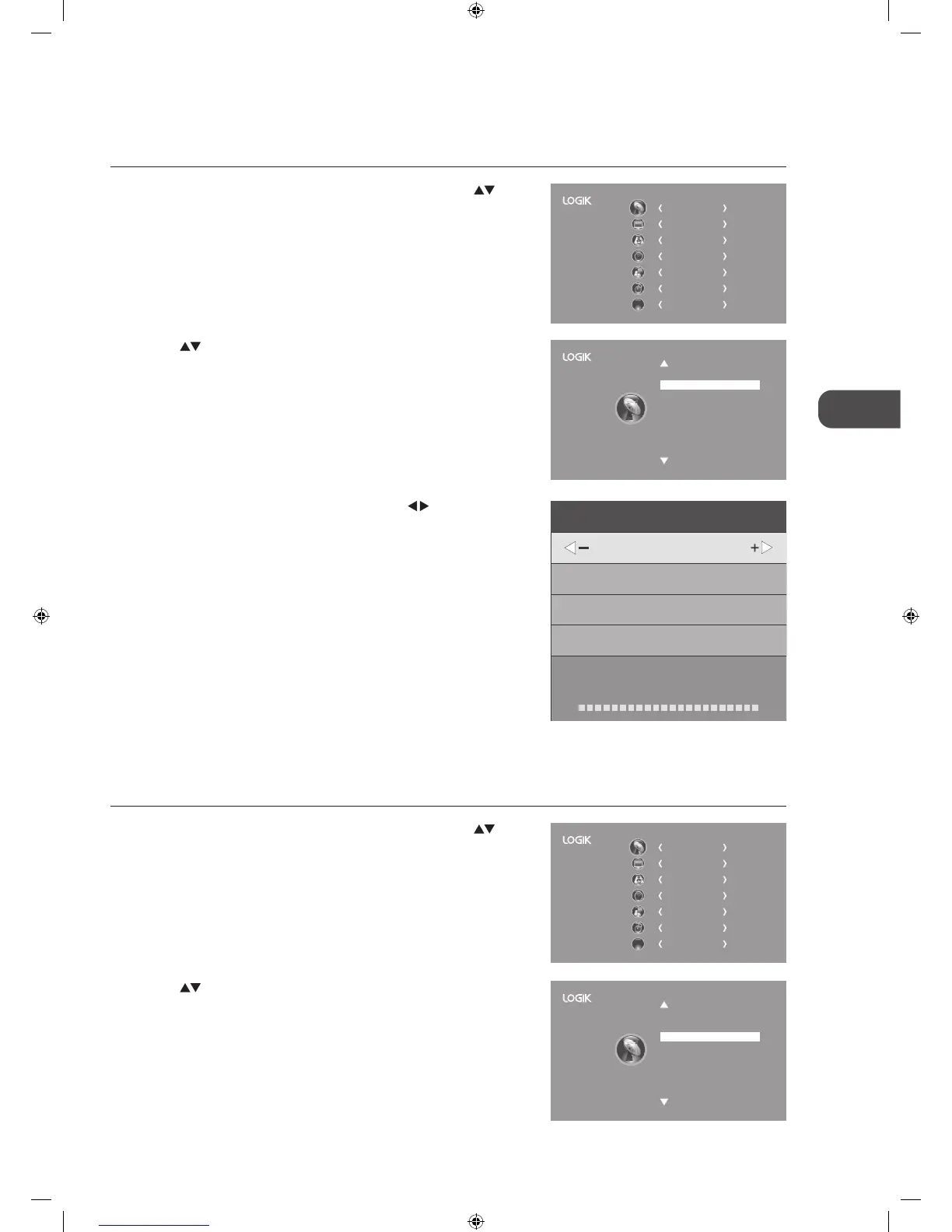
3. The DTV Manual Tuning screen will pop up. Press the
buttons
to select the desired UHF channel and then press the OK button to
commence the search of that channel. When the signal has been tuned,
the picture and signal strength will be displayed on the screen.
4. Press the MENU button to return to the main menu.
5. Press the EXIT button to exit the menu.
2. Press the
buttons to select DTVManualTuning and then press the
OK button.
DTVManualTuning
Allows you to make manual fine tuning adjustments to the channel under DTV mode.
1. Press the MENU button on the remote control and then press the
buttons to select the CHANNEL menu and then press the OK button.
CHANNEL
PICTURE
SOUND
TIME
OPTION
LOCK
EXIT
EXIT
Auto Tuning
DTV Manual Tuning
ATV Manual Tuning
Signal Information
CI Information
Software Update(OAD)Off
Software Update(USB)
Channel Edit
DTV Manual Tuning
UHF CH 5
Bad Nomal Good
Press OK to search
2. Press the buttons to select ATVManualTuning and then press the
OK button.
CHANNEL
PICTURE
SOUND
TIME
OPTION
LOCK
EXIT
EXIT
Auto Tuning
DTV Manual Tuning
ATV Manual Tuning
Signal Information
CI Information
Software Update(OAD)Off
Software Update(USB)
Channel Edit
ATVManualTuning
Allows you to make manual fine tuning adjustments if the channel reception is poor under ATV mode.
1. Press the MENU button on the remote control and then press the
buttons to select the CHANNEL menu and then press the OK button.
L32HE12_IB_Running Change_120528_Annie.indd 21 12年5月28日 下午7:01


 To Next Page
 Loading...