Logika Technologies Inc. Model LM-SD Operator’s Manual Rev. 11-2010
Web: www.logikatech.com Phone: 905-829-5841 Fax: 905-829-8787 Email: info@logikatech.com
P a g e | 12
5 Operation
5.1 Controls
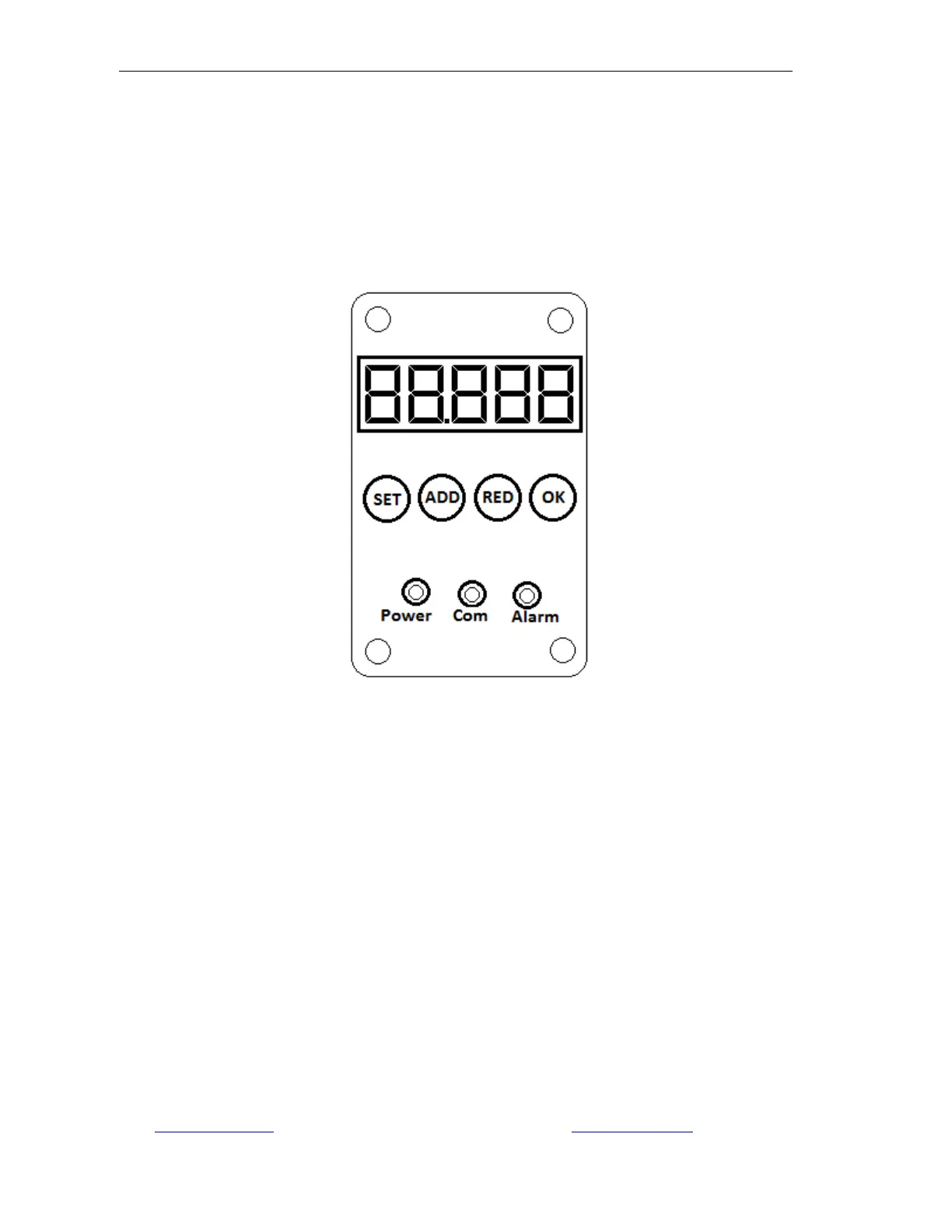
The LM-SD Sensor’s Control Panel is located under the protective cover plate on the back of
the sensor. The following functions are available at the Control Panel.
Figure 5.1: Control Panel
The five digit display shows the current reading in RUN mode and parameter information in
SETUP mode. See Section 5.3
BUTTONS
SET – Takes the unit into parameters or back to the menu
ADD – Increments the displayed parameter or value. Holding the button increases
the speed.
RED – Reduces the displayed parameter or value. Holding the button increases the
speed.
OK – Saves parameter values and exits
LEDs
Power – The unit is powered on
Com – Flickers to indicate communications to the processor are active
Alarm – Alarm threshold has been tripped.


 To Next Page