Need help?
Do you have a question about the Logitech K380 and is the answer not in the manual?
Describes the Function Keys (F1-F3) and how to use F1 to pair with a Fire Tablet or mobile device settings.
Steps to pair the Bluetooth keyboard with a personal device via device settings and selecting the keyboard name.
Enter the numerical pairing code and confirm successful connection to the keyboard.
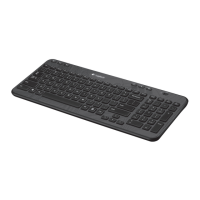
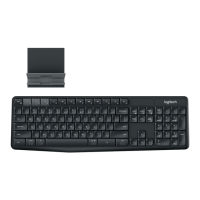
The Logitech K380 Multi-Device Bluetooth Keyboard is a versatile input device designed to connect wirelessly to various mobile devices that lack an external keyboard. This keyboard is particularly beneficial for individuals with disabilities, offering an alternative to on-screen keyboards which can be challenging for tasks like composing emails or searching the internet. Its raised keys provide a tactile interface that is easier to manipulate, and for those who are blind or visually impaired, the keyboard can be used in conjunction with a device's screen reader to navigate and interact with on-screen information effectively.
To begin using the Logitech K380, the first step is to power it on. The power button is conveniently located on the left side of the keyboard. Simply slide this button upward to activate the device. Once powered on, the keyboard is ready to be paired with your chosen device.
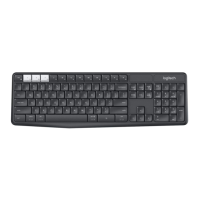
The keyboard features three distinct yellow keys on its first row, commonly referred to as Function Keys, labeled F1, F2, and F3. These keys are crucial for the pairing process. For instance, if you are pairing the keyboard with a Fire Tablet, you would press and hold the F1 key for 5 seconds. If you are using a different mobile device, the pairing process typically involves navigating to the device's Bluetooth settings.
The general pairing procedure for a personal device involves several steps. First, access your device's "Settings." Within the settings menu, locate and select "Connected Devices." It is essential to ensure that Bluetooth is enabled; if not, switch it to the "On" position. Next, tap on "Pair new device." Your device will then scan for available Bluetooth devices. From the list that appears, select the keyboard's name, which will be "Keyboard K380."
Upon selecting the keyboard, your device will prompt you to enter a numerical pairing code. This code will be displayed on your device's screen. You will need to use the physical keys of the Logitech K380 Bluetooth keyboard to type in this code. After entering the code, press the Return or Enter key on the keyboard to complete the pairing process.
Once the code has been successfully entered, the Bluetooth keyboard should be paired with your device. To verify a successful connection, you can return to the "Connected Devices" section of your device's settings. Under "Currently Connected," the name of the keyboard, "Keyboard K380," should be displayed, indicating that it is actively connected and ready for use.
The Logitech K380 Multi-Device Bluetooth Keyboard is designed for convenience and does not require charging. It operates on two pre-installed AAA batteries. To maximize battery life, it is recommended to switch the power button to the "off" position when the keyboard is not in use. This simple maintenance step helps conserve battery power and ensures the keyboard is ready for use when needed.
The Logitech K380 is compatible with a wide range of Bluetooth-enabled devices, making it a versatile tool for various operating systems and platforms. Compatible devices include:
This broad compatibility ensures that users can seamlessly integrate the Logitech K380 into their existing digital ecosystems, enhancing productivity and accessibility across multiple devices. The multi-device functionality allows users to switch between connected devices with ease, further streamlining their workflow.
 General
| Purpose | Universal |
|---|---|
| Hot keys | Yes |
| Numeric keypad | No |
| Keyboard layout | QWERTY |
| Device interface | Bluetooth |
| Bluetooth version | 3.0 |
| Keyboard language | English |
| Keyboard key switch | - |
| Keyboard form factor | Mini |
| Connectivity technology | Wireless |
| Product color | Blue |
| Keyboard style | Straight |
| LED indicators | Battery, Bluetooth |
| Wireless range | 10 m |
| Battery lifetime | 2 year(s) |
| Power source type | Battery |
| Battery technology | Alkaline |
| Keyboard battery type | AAA |
| Service life of battery | 24 month(s) |
| Number of batteries (keyboard) | 2 |
| Receiver weight | 1.8 g |
| Receiver dimensions (WxDxH) | 18.7 x 6.1 x 14.4 mm |
| Mac operating systems supported | Mac OS X 10.15 Catalina, Mac OS X 10.15.3 Catalina, Mac OS X 10.2 Jaguar, Mac OS X 10.3 Panther, Mac OS X 10.4 Tiger, Mac OS X 10.5 Leopard, Mac OS X 10.6 Snow Leopard, Mac OS X 10.7 Lion, Mac OS X 10.8 Mountain Lion, Mac OS X 10.9 Mavericks, Mac OS X 11.0 Big Sur |
| Other operating systems supported | ChromeOS |
| Mobile operating systems supported | iPadOS, iOS 11.0, iOS 11.4, iOS 12, iOS 13, iOS 14.5, Android 8.0, Android 9.0, Android 10.0, Android 10 |
| Windows operating systems supported | Windows 10, Windows 11 |
| Quantity per pallet | 1120 pc(s) |
| Master (outer) case width | 136 mm |
| Master (outer) case height | 287 mm |
| Master (outer) case length | 305 mm |
| Master (outer) case volume | 11900 cm³ |
| Master (outer) case weight | 4500 g |
| Harmonized System (HS) code | 84716060 |
| Master (outer) case GTIN (EAN/UPC) | 50992060614912 |
| Quantity per intermodal container (20ft) | 20096 pc(s) |
| Quantity per intermodal container (40ft) | 41664 pc(s) |
| Quantity per intermodal container (40ft, HC) | 46872 pc(s) |
| Package type | Box |
| Package depth | 296 mm |
| Package height | 32 mm |
| Package volume | 1288 cm³ |
| Package weight | 550 g |
 Weight and Dimensions
| Mouse weight | 107 g |
|---|---|
| Keyboard weight | 423 g |
| Mouse dimensions (WxDxH) | 59 x 107 x 26.5 mm |
| Keyboard dimensions (WxDxH) | 279.5 x 124.2 x 16.4 mm |

 To Next Page