English 7
Use your product
Product features
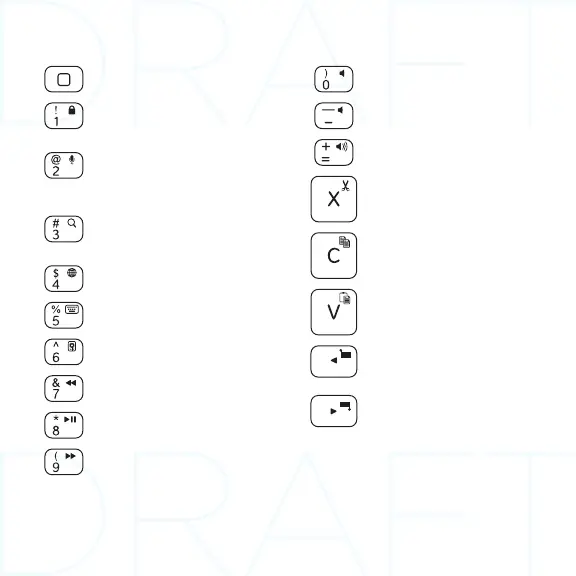
Home
Displays the iPad mini Home screen
Fn + 1 = Lock screen
Locks or unlocks the iPad mini
screen
Fn + 2 = Siri
Siri lets you use your voice to send
messages, schedule meetings, place
phone calls, and more
Fn + 3 = Search
Launches the iPad mini search
function
Fn + 4 = Switch language
Switches the keyboard language
Fn + 5 = Virtual keyboard
Shows/hides the virtual keyboard
Fn + 6 = Slide show
Fn + 7 = Previous track
Fn + 8 = Play/Pause
Fn + 9 = Next track
Fn + 0 = Mute
Fn + dash = Volume down
Fn + plus = Volume up
Fn + X = Cut
Fn + C = Copy
Fn + V = Paste
Fn + Left cursor = Select left
Selects text on the left, word
by word
Fn + Right cursor = Select right
Selects text on the right, word
by word
Fn + Space bar = Switch
applications
Note: Function keys To use, press and hold the Fn key, and then press a key listed above.



 To Next Page