Helpline No UK. 0871 2000 463 ROI. 01443 3940
Web Support: www.skymediauk.co.uk
Model Number: X19/17-USB
13
VOL
CH
1 2
3
4
5
6
7
8
0
9
OK
STANDBY
MUTE
ASPECT
MENU
EXIT
SOURCE
i
SUBTITLE
FAV
AUDIO
SLEEP
TV/RADIO
AV
TV GUIDE
ATV
USB
SIZE
REC
PVR
REC LIST
HOLD
DISPLAY
TEXT INDEX
INFO
R VEAL
.
P.Mode
S.Mode
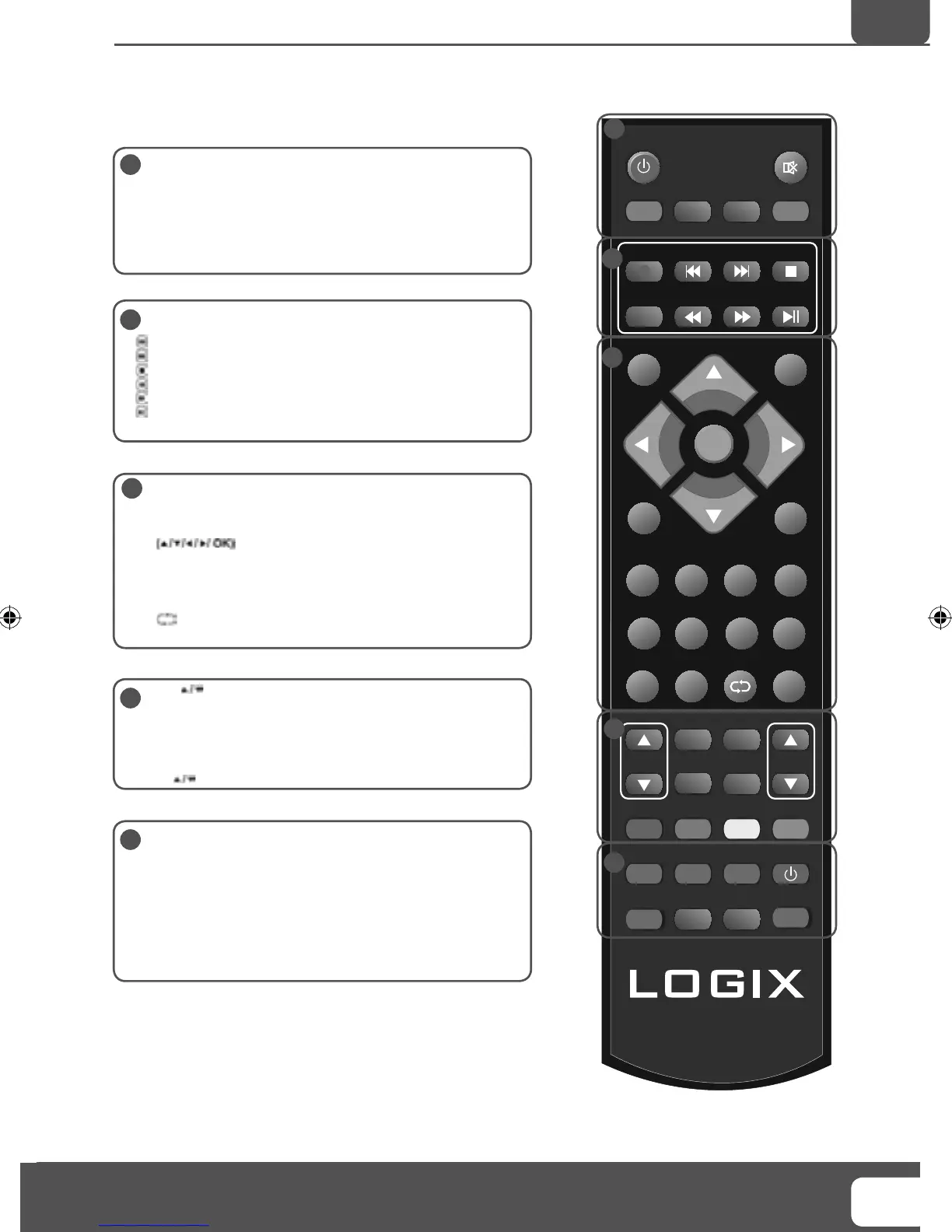
STANDBY - Switch on TV when in standby or vice versa
MUTE - Mute the sound or vice versa
ATV - Switch to analogue TV source
TV/RADIO - Switch to Freeview and switch between TV and
radio in Freeview mode
TV GUIDE - Opens the 7 Day TV Guide (Freeview mode)
USB - Switch to USB source
REC - To record what is currently on television
REC LIST - Opens the list of what you have previously recorded
- To restart the current chapter
- To advance forward to the next chapter
- To stop the playback
- To play in fast rewind mode
- To play in fast forward mode
- To play/pause (Pause live TV when USB Memory Stick is
inserted)
SOURCE - To display the input/source menu
INFO - Press once for now/next channel information
Press twice for programme information about current
programme
- Allows you to navigate the on-screen menus
and adjust the system settings to your preference
MENU - To display OSD menu
EXIT - To exit all menus
NUMBER BUTTONS - 0 – 9 to select a TV channel directly.
- To return to the previous channel viewed
FAV - To display FAV menu
VOL - To increase / decrease the sound level
SUBTITLE - To switch the dialogue at the bottom of the screen
(on/off)
ASPECT - To switch the screen between the different picture
formats
AUDIO - To change the audio language (if available)
CH To increase or decrease the channel being watched
TEXT - Teletext mode - To enter Teletext
INDEX - Teletext mode - To display the index page
REVEAL - Teletext mode - To reveal or hide the hidden words
DISPLAY - To switch off the screen when listening to radio
P.MODE - Press repeatedly to cycle through the available picture
modes
SIZE - To change the display size in Teletext mode
HOLD - Hold current page which is displayed
S.MODE - Press repeatedly to cycle through the available sound
modes
1
1
2
3
4
5
4
5
2
3
REMOTE CONTROL
Remote Control
19- 17 Logix manual.indd Sec1:1319- 17 Logix manual.indd Sec1:13 18/12/2009 10:06:3918/12/2009 10:06:39


 To Next Page