LogTag UTRIX Work Instruction Manual Revision 1.07 MP Release Page 39/52
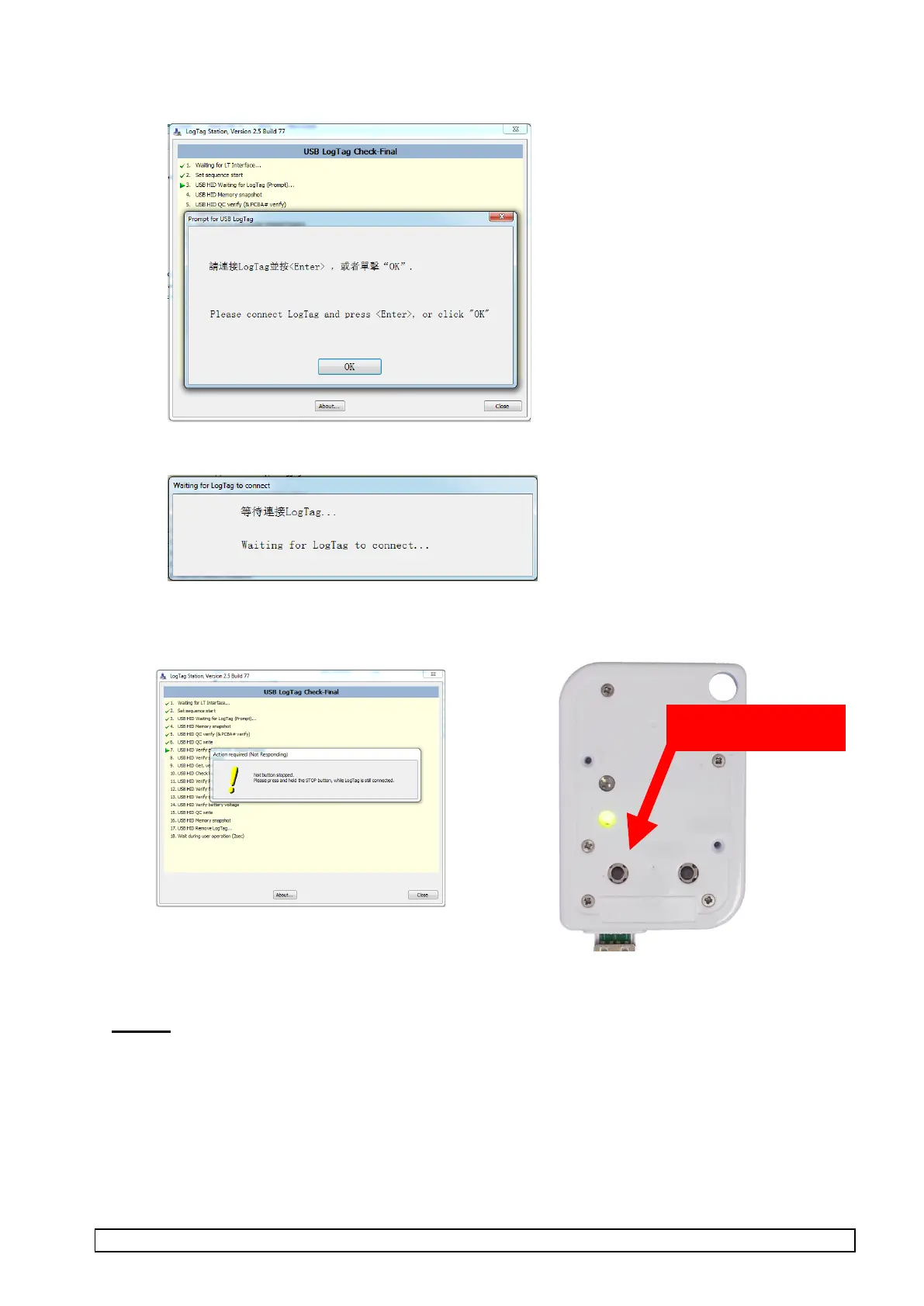
4. Once the following screen is displayed, insert LogTag then click OK or press ENTER.
“Waiting for LogTag to Connect…” will try and connect to LogTag.
5. Test #7 will present the following screen, press the STOP button to proceed with the remaining
checks:
6. Re-attach USB protective cap at the end of the test.
7. Repeat from Step 2 for all units.
NOTES:
1. During this test, the temperature sensor reading is checked and is compared to the temperature
sensor installed in the interface. If the unit or the interface has been over-handled or the
temperatures have not been allowed to stabilise then the Verify temperature sensor reading part of
the test will fail.
2. Recorded readings are saved in the ‘Check-Final’ directory (C:\Program Files\LogTag
Recorders\LogTag Station\Check-Final) under a directory coded with the year and week of year.
Data is stored in format that can be read using LogTag Analyser.



 To Next Page