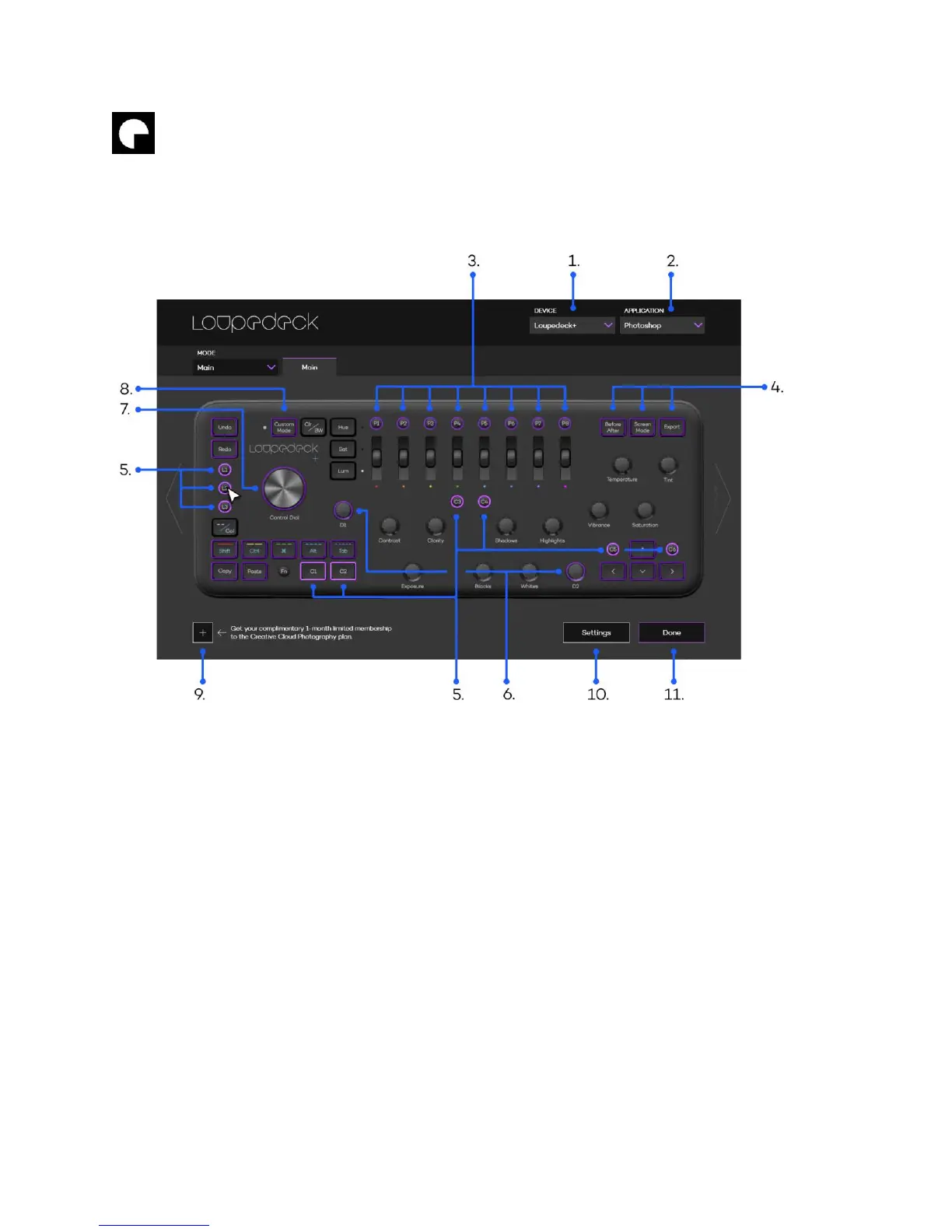
Within the Loupedeck configuration software’s main level, you can select which device,
application or group of buttons / dials you wish to customize. When you hover over the buttons
with a mouse they will light up (L1-L3 & C1-C6 on the image below).
1. Select your Loupedeck device you wish to configure
2. Select application you want to control with the Loupedeck console
3. Configure preset buttons P1-P8
4. Tune up other customizable buttons (Before/After, Screen Mode & Export)
5. Configure customizable buttons L1-L3 & C1-C6
6. Configure customizable dials D1 & D2
7. Configure Control Dial
8. Select Custom Mode to configure all basic dials
9. Check out our partner offers tailored for Loupedeck users!
10. Global Settings (e.g. Export/Import Loupedeck mapping layouts).
11. Press Done to close configuring software.
After selecting a button or dial group, a lit box will appear on top of Loupedeck software, allowing
specific button configurations (e.g. selecting L1-L3 & C1-C6 group to be configured):



 To Next Page