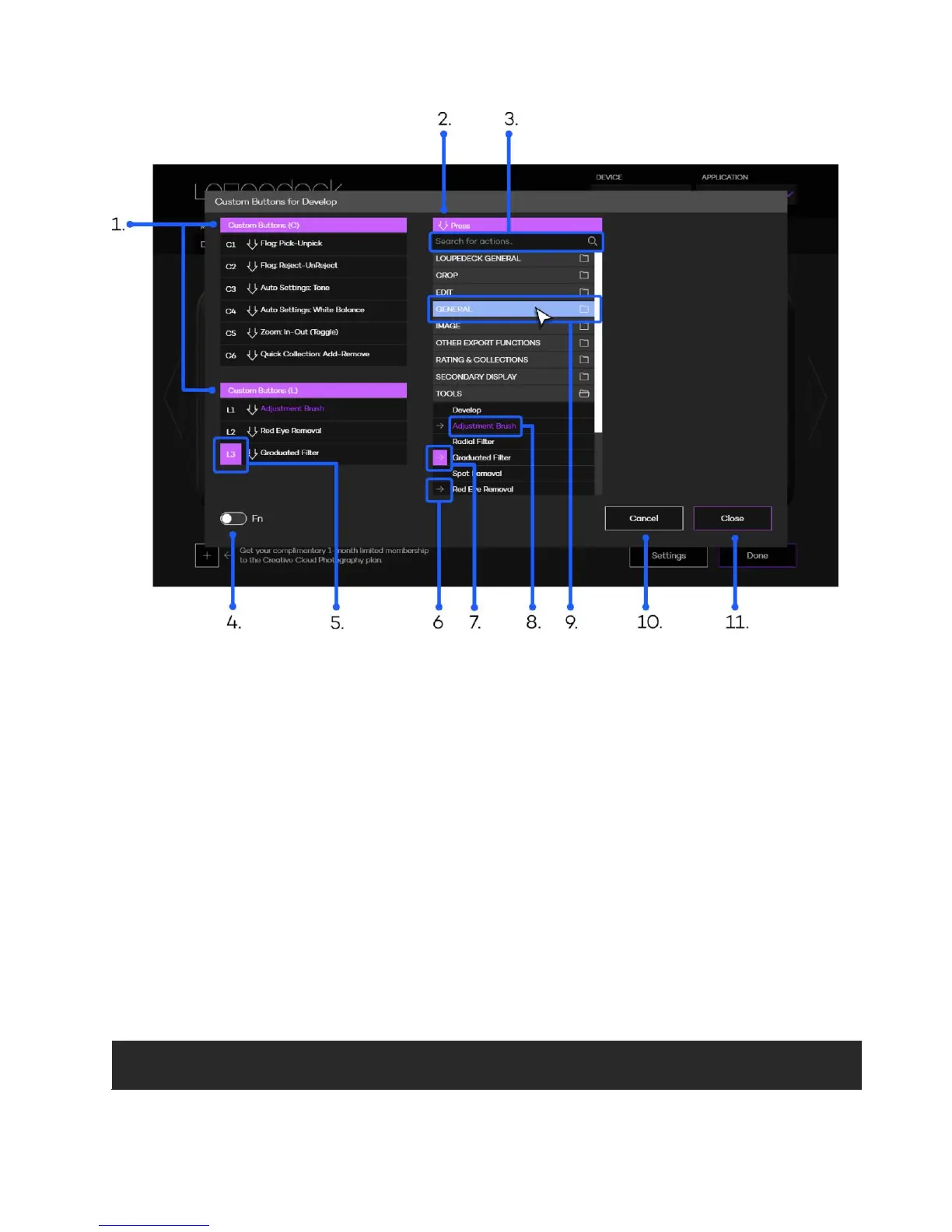
1. Group of buttons or dials that are assigned (e.g. C1 -button acts as Pick-flag)
2. List of actions that can be assigned
3. Search bar for locating specific actions by simply typing the name
4. Switch for accessing FN layer (second layer of assignable actions, e.g. FN+C1)
5. Purple box indicates that this button is under configuration
6. Gray arrow indicates that this action is already assigned
7. Purple box with arrow indicates that action is assigned to the corresponding button
8. Purple text indicated that this action has just been assigned
9. Light blue group box indicates that mouse is hovering over the group name
10. Cancel discard changes and exits action configuration
11. Close approves changes and exits action configuration
When a function is assigned to a button or a dial the effect occurs immediately (no need to press
“close” and “done” to apply changes).
Note! There are some general Loupedeck functions for buttons and dials that are available on
every supported software.



 To Next Page