Code: MSGB202$0500.doc 18/06/2004 P. 14 / 20
Front panel
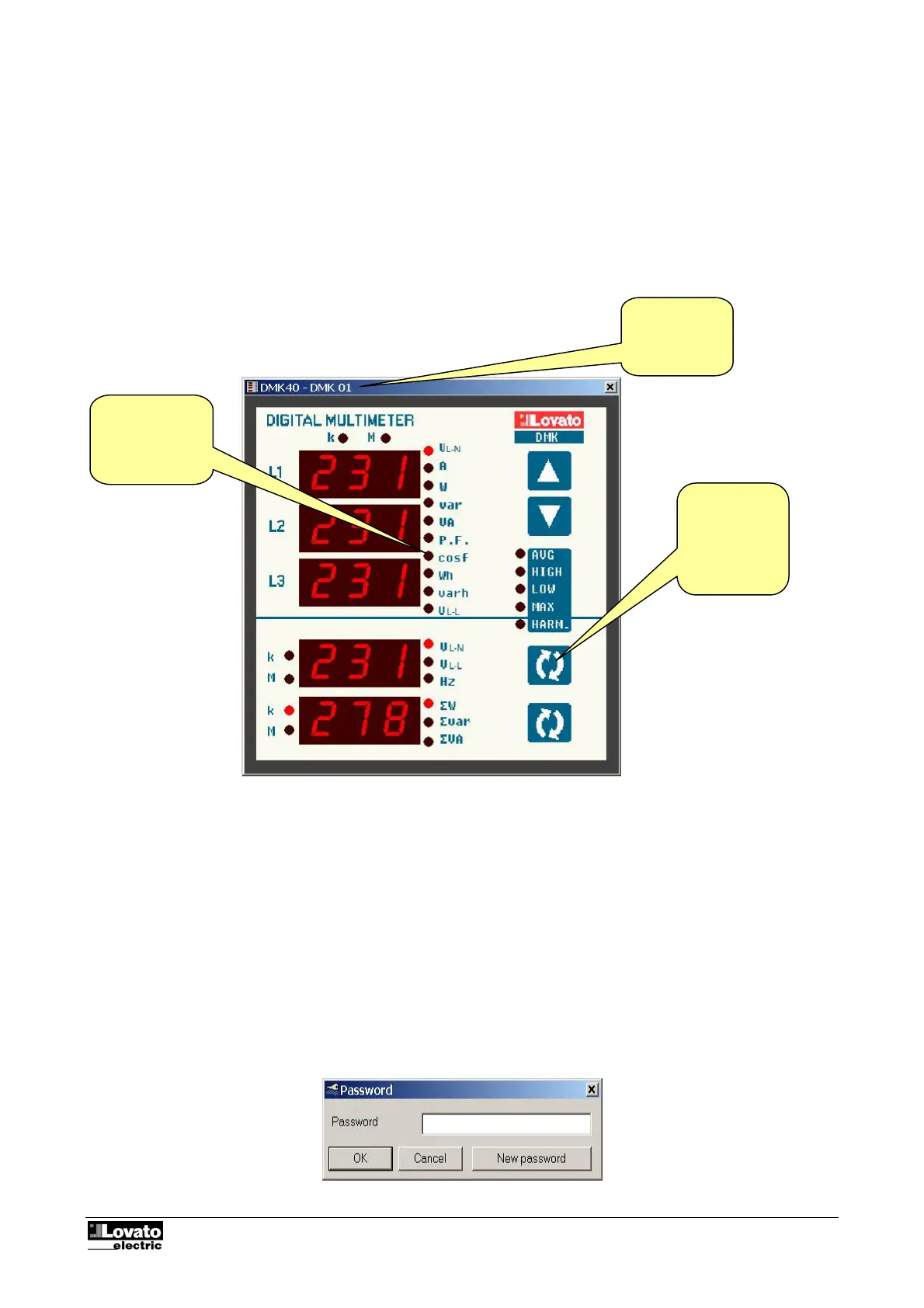
You can display a 'virtual' representation of the front panel of the DMK on the monitor of the PC using the
remote control software. When you access this window from the Display-Front Panel menu, the front panel of
the DMK is shown, with real-time display of the readouts and leds in their current status. Clicking with the
mouse on the keys, you can select the measurements and functions in the same way as on the physical
multimeter. However, you cannot access those functions (such as parameter programming, reset counters,
etc.) that require simultaneous pressing and/or holding down of the keys.
Note:
The quality of the graphic representation of the front panel may vary according to the graphic resolution of
your PC and/or the monitor settings used.
Fig. 7.1 – Display-Front panel
Password
When the program is started, some of the functions are disabled. You can enter the password that permits
access to all the functions, in particular those listed below, from the Password menu:
• Modification of the settings of the remote control
• Modification of the password
• Elimination of records from the Alarms and Data collection databases
• Access to the page editor
• Modification of the setup parameters of the DMK connected
Fig. 8.1 – Password
Name of the
multimeter
selected
Clicking on the
keys has the
same effect as
on the real
panel
Real-time
display of the
status of the
readouts and
leds



 To Next Page