52 |
Installation | Link-9 User Guide
First startup conguration
The first time the radio is powered up, the user is prompted to make
a series of setting selections in order to allow the radio to perform
to its full potential. Some steps must be completed; some are
optional and can be completed later. The steps are outlined below
for reference:
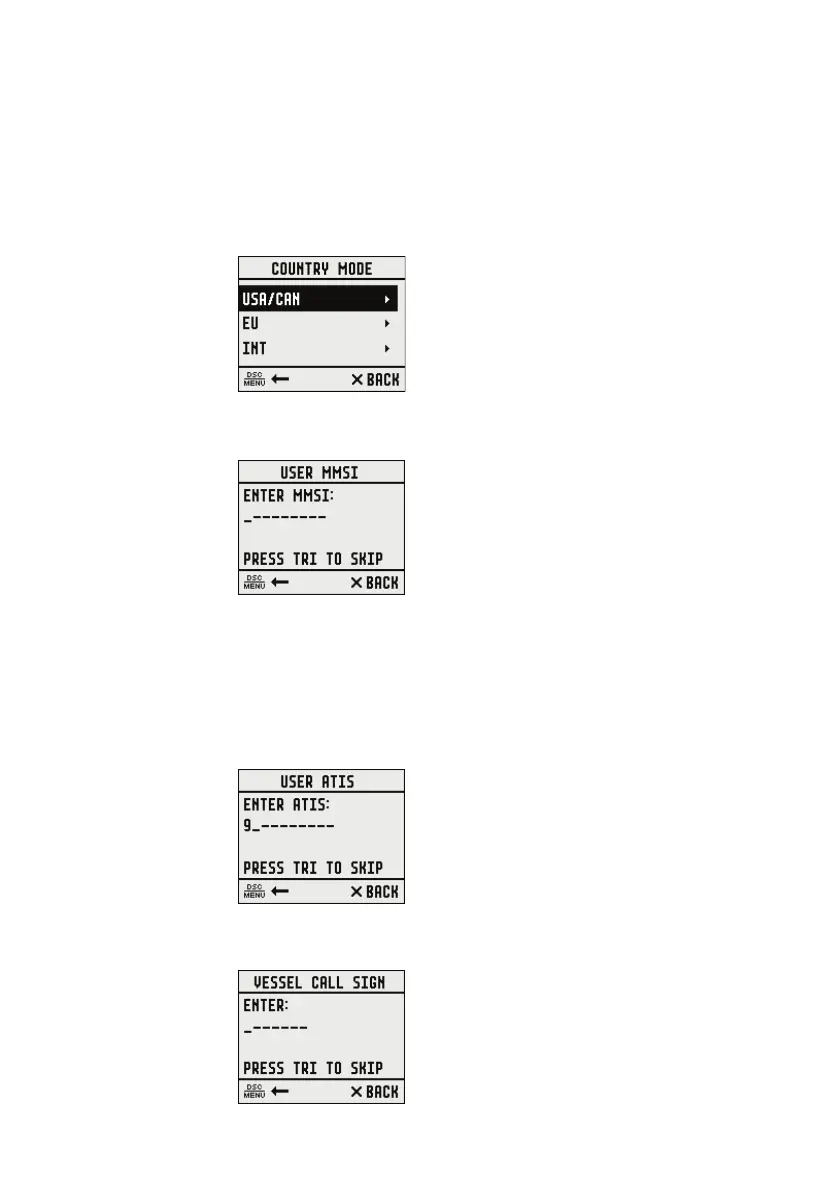
1. Select the country and region the radio will be operated in:
2. Enter MMSI number if known, or skip to next step. Re-enter number
to confirm correct entry:
¼ Note: MMSI entry can only be done once. Changing the MMSI
requires radio be returned to a Lowrance dealer.
3. If you have selected the Country mode to be EU, some EU regions
require you to setup ATIS. Enter the ATIS ID number. Re-enter
number to confirm correct entry:
4. Enter vessel call sign if known, or skip to next step (maximum 7
digits):


 To Next Page