EasyManua.ls Logo

LTH Electronics MXD75 - Page 95

LTH Electronics MXD75
631 pages
Print Icon
To Next Page IconTo Next Page
To Previous Page IconTo Previous Page
Loading...
Optional Software Functions
- 22 -
User Interface Guide
Optional Software
Unlock Software
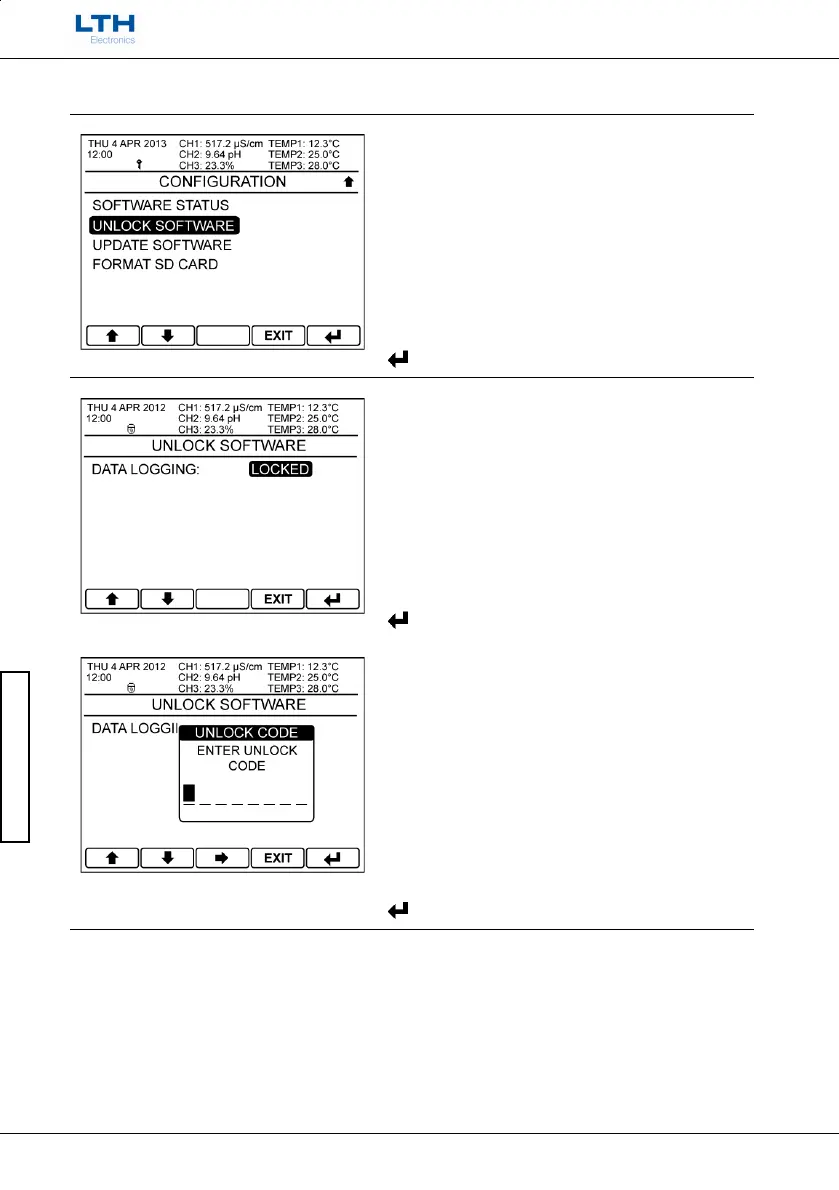
Upon receipt of the unlock code return to the
Configuration menu and select Unlock Software.
/
Select Option
EXIT
Return to Main Menu
Enter Option
Unlock Software
Select the optional software function you wish to
unlock.
/
Select Option
EXIT
Return to Main Menu
Enter Option
Enter the required Unlock Code.
If the code is incorrect the user will be prompted to
try again.
If the code is correct the
function will now be
unlocked
/
Change Character
Select Next Character
EXIT
Cancel
Enter Code

Table of Contents

Other manuals for LTH Electronics MXD75

Related product manuals