Digital Video Recorder Quick Start Guide
6
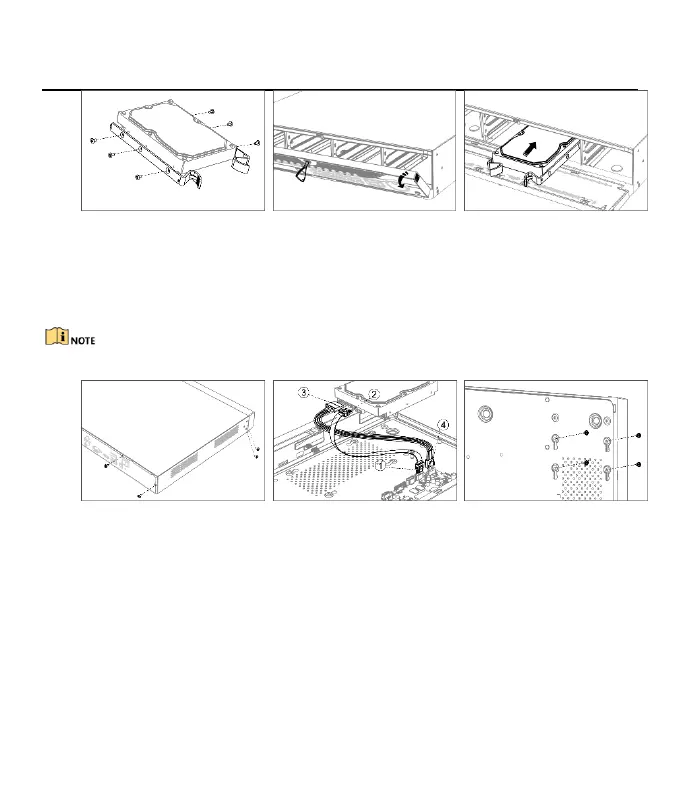
Figure 2-4 Fix Mounting Ear
Figure 2-5 Open Front Panel
2.2.3 Fix-on-Bottom Installation
Fix-on-bottom installation is applicable when it requires to install the HDD at the internal bottom.
Step 1 Unfasten screws on each panel to remove the device cover. Refer to Figure 2-7.
Step 2 Connect the data cable and power cable. Refer to Figure 2-8.
Step 3 Match HDD screw threads with the reserved holes on the device bottom, and fix HDD with screws. Refer
to Figure 2-9.
You can repeat the steps above to install other HDDs.
Step 4 Reinstall the device cover and fasten screws.
2.3 RS-485 and Controller Connection
Use RS- 485 interface to connect PTZ with DVR.
Before you start
Ensure both controller and DVR are grounded.
Step 1 Pull out the pluggable block at the RS-485 terminal block.
Step 2 Press and hold the orange part of the pluggable block, insert signal cables into slots.
Step 3 Release the orange part. Ensure signal cables are in tight.
Step 4 Connect A+ on PTZ to D+ on terminal block and B- on controller to D- on terminal block. Fasten stop
screws.
Step 5 Plug pluggable block back into terminal block.









 To Next Page