E3
TECHNICAL
DETAILS
EXPLODED AND
PARTS LIST
INSTALLATIONMAINTENANCE
DETAILS OF
OPERATION
TROUBLE
SHOOTING GUIDE
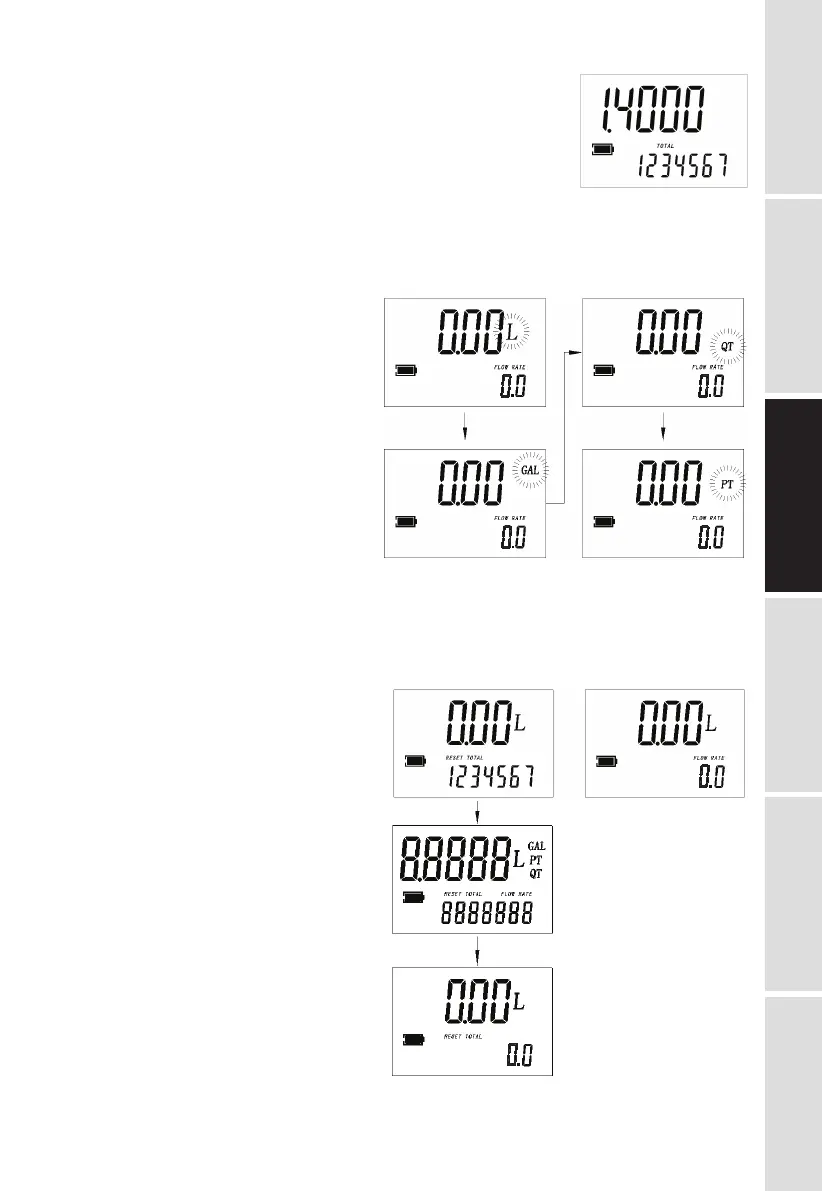
• Show current correction factor and general total (See Fig. 5)
Press MOVE and RESET together and hold for less than
3 seconds. Value “1.4000” is the correction factor which
can be reset; “1234567” is the general total which cannot
be reset.
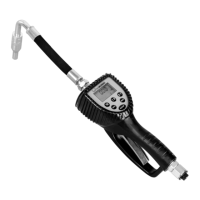
• Measurement unit change (See Fig. 6)
Press MOVE and RESET together and hold for more than 3 seconds.
Zone 7 on the display is the current unit. Press RESET to chose a different measurement unit
and then press MOVE and hold for more than 3 seconds to confirm.
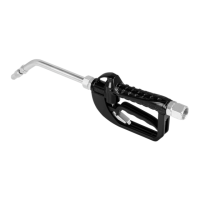
• Reset The Resettable Total (See Fig. 7)
When the meter is on standby, press the RESET key for more than 3 seconds to reset the
present total first.
Fig. 6
Fig. 7
Fig. 5


 To Next Page