E4
TECHNICAL
DETAILS
EXPLODED AND
PARTS LIST
INSTALLATIONMAINTENANCE
DETAILS OF
OPERATION
TROUBLE
SHOOTING GUIDE
PROCEDURE FOR ENTER THE CORRECTION FACTOR DIRECTLY
Carefully follow the procedure indicated below.
FORMULA
Proper correction factor = current correction factor×(actual value/ display value)
Example:
Actual value 20.75
Display value 18.96
Current correction factor 1.000
Proper correction factor 1.000×(20.75/18.96)=1.000×1.094=1.094
1
2
3
4
5
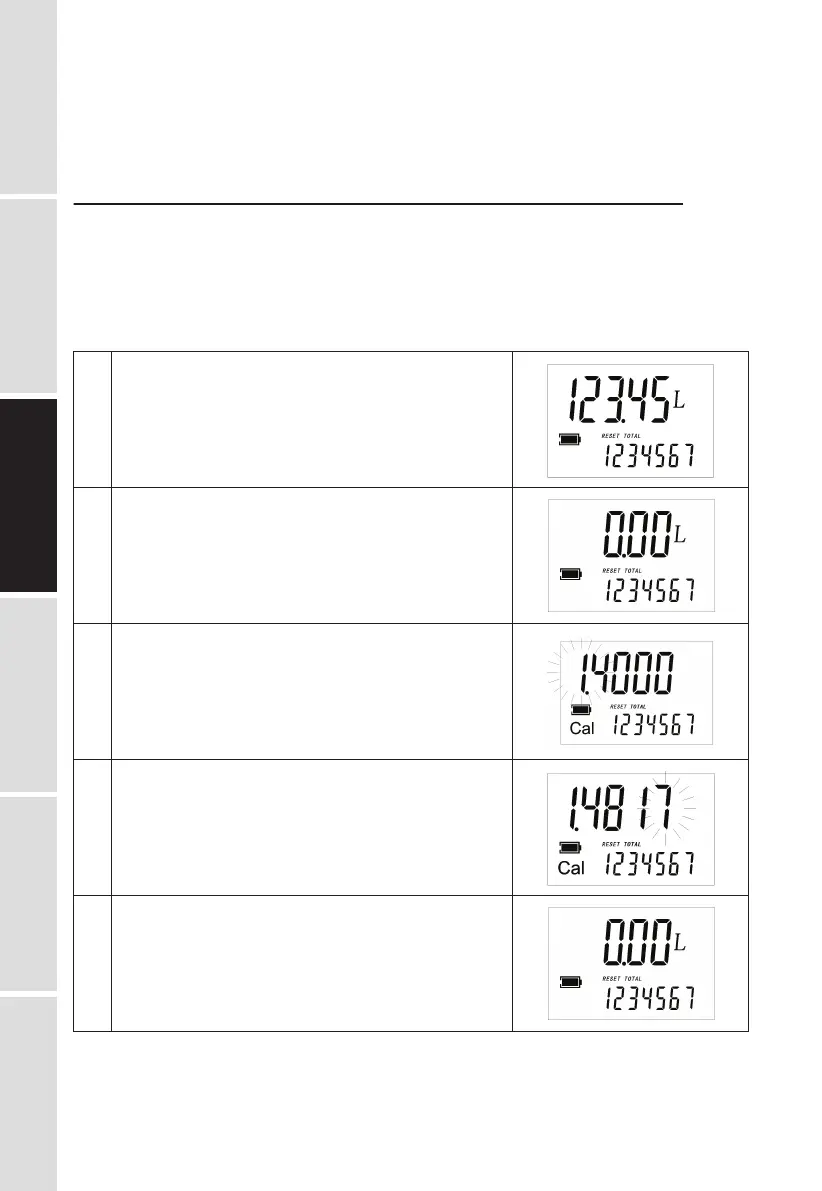
Wait for the meter to go standby.
Reset the resettable total.
Press the MOVE key. Keep it pressed until it shows similar
to the right image(the digit flash in ① zone ), which means
the meter is under the calibration mode.
Press the RESET key to choose the right digit from 0 to 9.
Press the MOVE key to start the next digit. So the digit of
correction factor can be changed one by one.
Make sure the correction factor is right, press the MOVE key.
Keep it pressed until the indication of calibration mode quits
and the factor is saved.


 To Next Page