E5
TECHNICAL
DETAILS
EXPLODED AND
PARTS LIST
INSTALLATIONMAINTENANCE
DETAILS OF
OPERATION
TROUBLE
SHOOTING GUIDE
MODIFY THE CORRECTION FACTOR IN FIELD
PLEASE CAREFULLY FOLLOW THE PROCEDURE INDICATED BELOW.
1
2
3
4
5
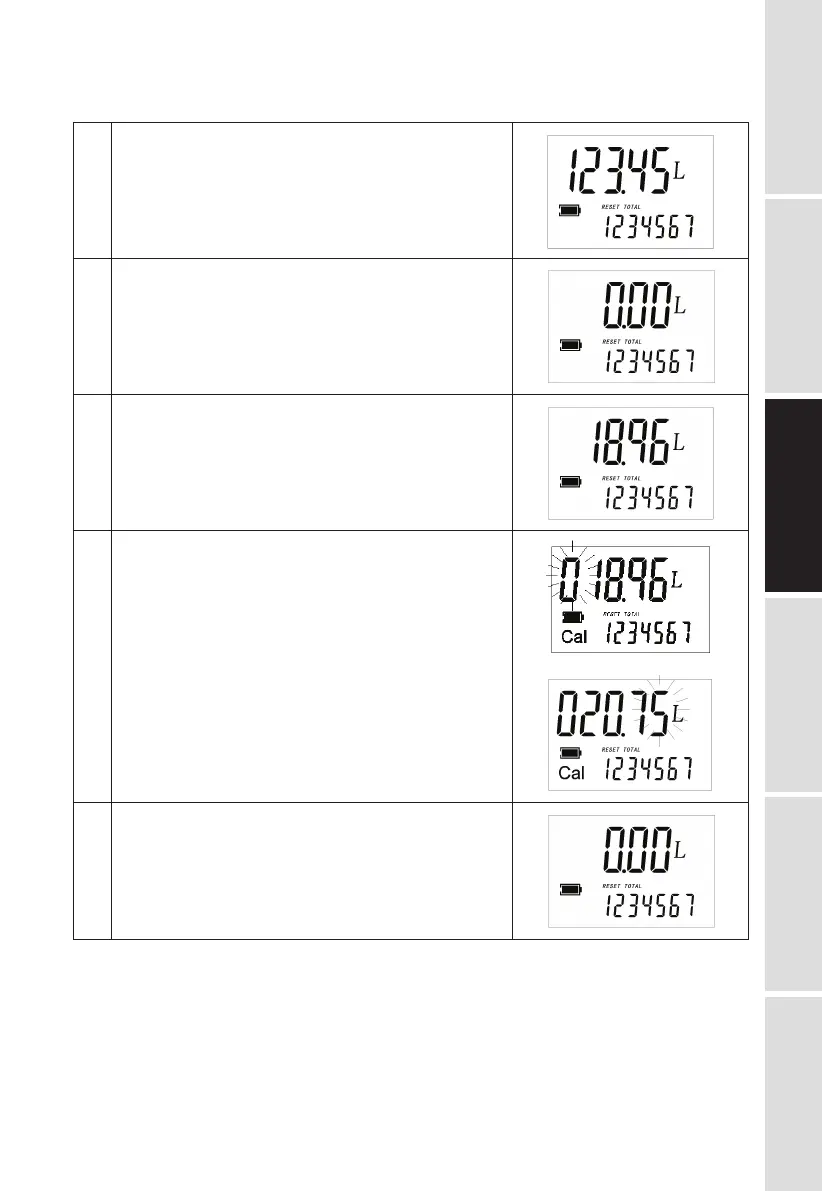
Wait for the meter to go standby.
Reset the resettable total.
Start dispensing into a measuring glass.
Stop dispensing when over 5 Litres of volume is reached,
read out the actual value. The volume that is displayed
on the LCD is the Display Value, not the Actual Value
which may be slightly higher. For example, in the figure
on the right, the Display Value is 18.96 while the Actual
Value is 20.75.
Press the MOVE key. Keep it pressed until it shows as the
right fig., with the digit flashing in ① zone. Press the MOVE
key to go the the next digit so that the Actual Value can be
input.
Make sure the correction factor is right and then press the
MOVE key. Keep it pressed until calibration is finished and
the factor is save. The meter will then return to to be on
standby.


 To Next Page