Installation Instructions
1 | Page
LUCCI Slim Line Fan Remote Control
SKU# 210012
Rated Voltage 220-240V~ 50Hz
Thank you for purchasing this quality Lucci product. To ensure correct function and safety, please read and follow all
instructions carefully before using the product. Please keep instructions for future reference.
• This light fitting is covered by a 12 month warranty. Please retain proof of purchase and evidence of installation by a
licensed electrician.
• Warranty will be void if there is any damage due to improper usage or modification to the fitting.
Installation requirements
• Must be installed by a licensed electrician.
• All wiring and installation of the light fitting must adhere to local and national wiring rules.
eg. AS/NZS 3000:2007/Amendment 2:2012 Electrical installations.
• Do not exceed rated power input specification.
• Select a suitable location for installation;
- This product is suitable for indoor use only.
• This ceiling fan remote controller is only suitable for controlling the fan motor and the light kit associated with the
ceiling fan only. Any other use would be considered as misuse and warranty is void.
• Do not install fan remote control with existing fan wall controller. Remove existing wall controller and replace with a
double pole wall switch, to power the fan remote control. Do not use a solid state dimmer with this ceiling fan remote
control.
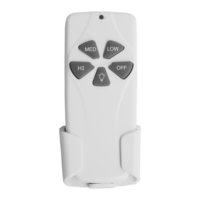
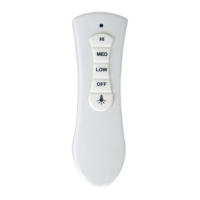
This remote controller is designed to control your ceiling fan speed and light. There are 4 buttons (HI, MED, LOW, OFF)
to control the fan speed and one button to control light on/off.
Receiver (controller) Transmitter (remote)


 To Next Page
 General