EasyManua.ls Logo

Lumantek ez-SHV+ - User Manual

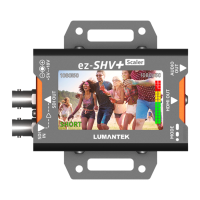
Lumantek ez-SHV+
16 pages
Print Icon
To Next Page IconTo Next Page
Loading...
SDI to HDMI
Converter with
Display and Scaler
Operation manual
Manual
Updated November. 2019
Question and Answer IconNeed help?

Do you have a question about the Lumantek ez-SHV+ and is the answer not in the manual?

Summary

ez-SHV+ Product Overview

Inputs and Outputs

Details the physical input and output connections for SDI and HDMI signals, including audio.

SD;HD;3 G Signal Support

Confirms the device's compatibility with various SDI signal standards: SD, HD, and 3G.

Integrated TFT-LCD Display

Highlights the 2.7-inch TFT-LCD for video input display and monitoring.

Mode Change Push Switch

Explains the function of the push switch used for changing operational modes.

Interface and Controls

DIP Switch Settings

Configuration options for video output resolution, aspect ratio, and LCD brightness via DIP switches.

LCD Display ON;OFF Operation

Instructions on how to turn the LCD display ON or OFF using the mode switch.

SDI Input Monitoring (Eye Pattern;Audio Meter)

Guides on activating the SDI input eye pattern or audio level meter on the LCD.

LCD Monitor Rotation Control

Procedures for rotating the LCD display view by 0 or 180 degrees.

HDMI Mirrored Output for Teleprompter

Steps to enable or disable the HDMI mirrored output for teleprompter applications.

Product Configuration and Power

AC to DC Adapter Specifications

Details the input and output specifications for the included AC to DC power adapter.

Technical Specifications

Data Input and Output Formats

Lists supported SDI video input and output formats, including video and audio interfaces.

Device Connections

Overview of power input, DIP switch, and mode switch connections and their functions.

Display and Electrical Details

Information on the LCD display capabilities and electrical power requirements.

Summary

ez-SHV+ Product Overview

Inputs and Outputs

Details the physical input and output connections for SDI and HDMI signals, including audio.

SD;HD;3 G Signal Support

Confirms the device's compatibility with various SDI signal standards: SD, HD, and 3G.

Integrated TFT-LCD Display

Highlights the 2.7-inch TFT-LCD for video input display and monitoring.

Mode Change Push Switch

Explains the function of the push switch used for changing operational modes.

Interface and Controls

DIP Switch Settings

Configuration options for video output resolution, aspect ratio, and LCD brightness via DIP switches.

LCD Display ON;OFF Operation

Instructions on how to turn the LCD display ON or OFF using the mode switch.

SDI Input Monitoring (Eye Pattern;Audio Meter)

Guides on activating the SDI input eye pattern or audio level meter on the LCD.

LCD Monitor Rotation Control

Procedures for rotating the LCD display view by 0 or 180 degrees.

HDMI Mirrored Output for Teleprompter

Steps to enable or disable the HDMI mirrored output for teleprompter applications.

Product Configuration and Power

AC to DC Adapter Specifications

Details the input and output specifications for the included AC to DC power adapter.

Technical Specifications

Data Input and Output Formats

Lists supported SDI video input and output formats, including video and audio interfaces.

Device Connections

Overview of power input, DIP switch, and mode switch connections and their functions.

Display and Electrical Details

Information on the LCD display capabilities and electrical power requirements.

Lumantek ez-SHV+ Specifications

General IconGeneral
CategoryMedia Converter
Modelez-SHV+
Audio SupportEmbedded audio
Fiber TypeSingle-mode or Multi-mode
Power Supply5V DC
Storage Temperature-20°C to 70°C
InputSDI
OutputHDMI
SDI Formats SupportedSMPTE 259M, SMPTE 292M, SMPTE 424M
Wavelength1310nm
Max DistanceUp to 10 km
Connector TypeLC
Humidity90% non-condensing

Related product manuals