Need help?
Do you have a question about the Lumantek ez-HSV+ and is the answer not in the manual?
Overview of the ez-HSV+ converter, its capabilities, and a list of its key features.
Diagram illustrating the internal signal path and components of the ez-HSV+ converter.
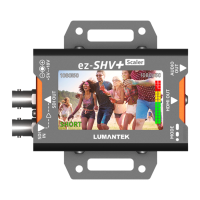
Diagram identifying all physical ports, the LCD display, and control buttons on the device.
Detailed explanation of DIP switch configurations for output resolution, ratio, and audio input.
Information on how the LCD screen displays input/output resolutions and audio level meters.
Adjusting LCD backlight brightness (dark or bright) using the MODE switch.
Turning the LCD screen ON or OFF by pressing and holding the MODE switch.
Rotating the LCD screen display by 0 or 180 degrees using the MODE switch.
Visual representation of the ez-HSV+ unit and its accompanying AC to DC power adapter.
Details on analog audio and HDMI video input formats, and SDI video output formats.
Information on the LCD display, power input requirements, consumption, and operating temperature.
Dimensions and weight of the ez-HSV+ unit.
Overview of power input, DIP switch, and MODE switch connections and functions.
 Video Input
| analog audio input | Stereo Jack x1 |
|---|---|
| hdmi video input | SD/ HD/ 3G (HDMI Type A) x 1 |
| video formats | 720x480i@59.94/60, 720x576i@50, 1280x720p@50/59.94/60, 1920x1080i@50/59.94/60, 1920x1080p@23.94/24/25/29.97/30, 1920x1080p@50/59.94/60 |
Video Output| sdi video output | SD/HD/3G-SDI (BNC 75Ω) x1 |
|---|---|
| video formats | 720x480i@59.94, 720x576i@50, 1280x720p@50, 1280x720p@59.94, 1280x720p@60, 1920x1080i@50, 1920x1080i@59.94, 1920x1080i@60, 1920x1080p@23.98, 1920x1080p@24, 1920x1080p@25, 1920x1080p@29.97, 1920x1080p@30, 1920x1080p@50, 1920x1080p@59.94, 1920x1080p@60 |
Connections| power connection | DC Power Input (DC Jack) x1 |
|---|---|
| dip switch | (6 Pole) x1 Video In/Out Resolution, Video Output Ratio, Audio(INT. or EXT.) |
| mode switch | (Push Switch) x1 LCD ON/OFF, Menu Selection |
 Display
| display type | 2.7 inch TFT LCD |
|---|---|
| display features | Input Video Display, In/Output Video Resolution Display, Input Audio Level Meter Display |
Electrical| power input | DC +5V to +18V |
|---|---|
| power consumption | 4W(max.) |
| operation temperature | 0~45℃ |
Physical Characteristics| dimensions | 86.3x57.2x26.6 (include connector) |
|---|---|
| weight | 0.66lbs (0.3 kg)(typ.) |

 To Next Page