7|Page
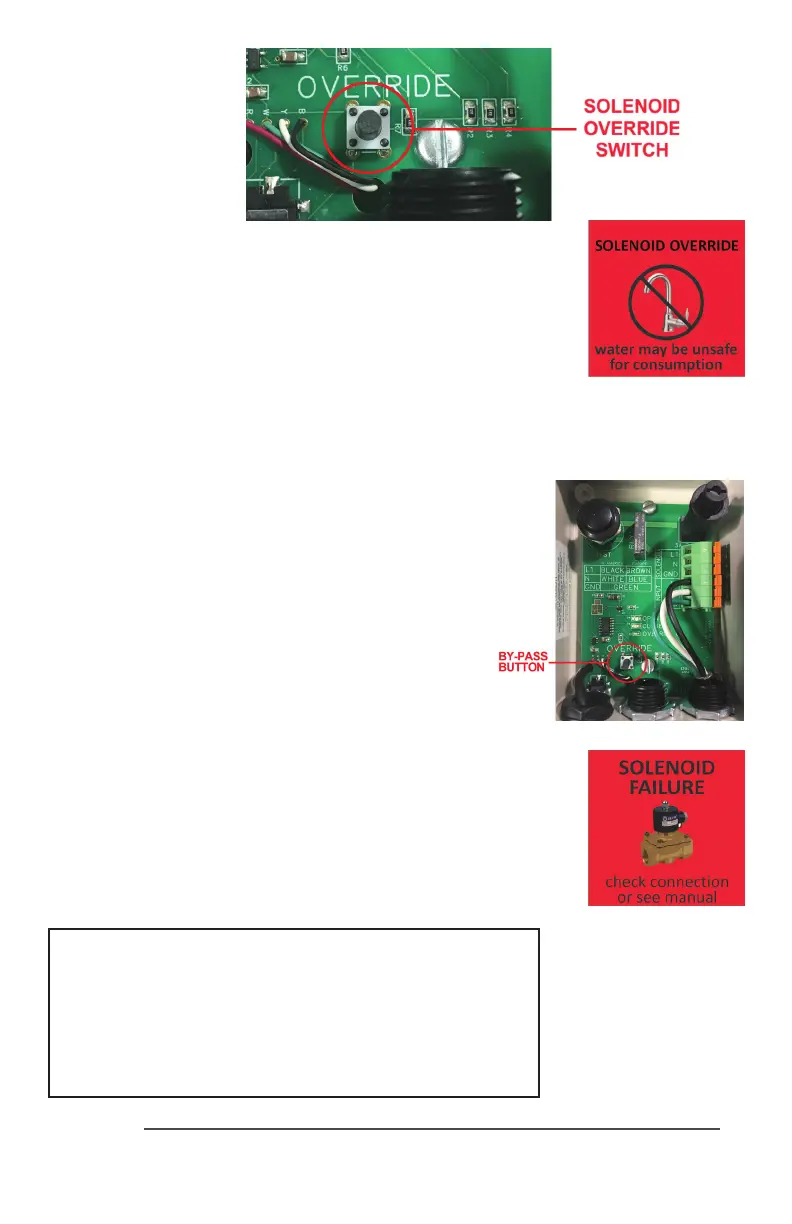
Figure 10
SolenoidBypass
Buon
Oncethisbuonhasbeenpressed,thesystemwillremaininthis
overridemoderegardlessofwhetherornotthecondioncausingthe
solenoidacvaonhasbeenremediedornot.Toresetthesystem,
thepowertothecontrollermustbeshutoandrestarted.While
inthisoverridemodethecontrollerwillintermientlydisplayared
“SOLENOIDOVERRIDE”screen(seeFig.11).
Figure 11
SOLENOIDOVERRIDE
Screen
DISABLING EMERGENCY BYPASS
Incertainregulatedapplicaons,theavailability,anduse,
oftheemergencybypassfeaturemaybeinviolaonofthe
local,state/provincialcodes.Ifthisisthecase,thebypass
featurecaneasilybedisabledbyphysicallyremovingthe
bypassbuon.Toaccomplishthis,carefullyuseapairof
needlenosepliersandphysicallyremovetheactualbypass
buon(marked“OVERRIDE”)fromthecircuitboard.
Figure 12
SOLENOIDFAILURE
Screen
OTHER FAILURE MODES
Intheeventthereisanissuewiththesolenoidconneconfrom
theIEPcabletothecontroller,thesystemwillregistera“SOLENOID
FAILURE”screenonthecontroller(seeFig.12).
CAUTION: BEFORE PERFORMING ANY
WORK ON THE SOLENOID MODULE, THE
POWER CORD MUST BE DISCONNECTED
FROM ITS POWER SOURCE (WALL PLUG).



 To Next Page