Work support
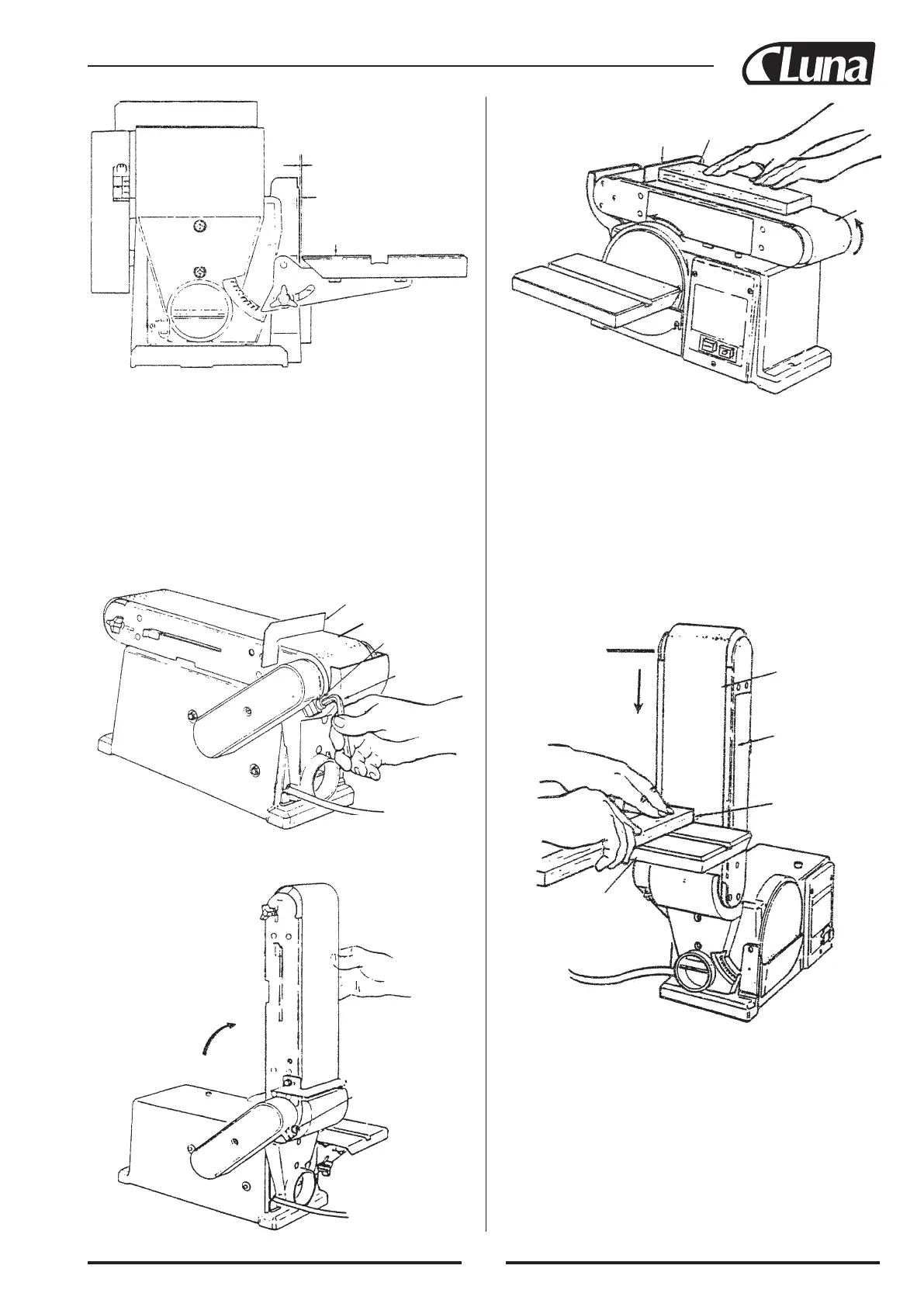
Work piece
Sanding
belt
Sanding belt
Belt bed
Workpiece
Worktable assembly
1/16 inch maximum
Sanding surface
Table
Work support
Belt bed
Hex socket
screw
Hex “L”
wrench
Hex socket screw
WARNING: To avoid trapping the work or fingers between the
table and sanding surface, the table should be repositioned on the
table support to retain a maximum of 1/16 inch distance between
sanding surface and table.
POSITIONING BELT BED
A bed locking hex socket head screw locks the belt bed in a verti-
cal or horizontal position:
To adjust vertical position:
1. Remove the work support.
2. Loosen the hex socket head locking screw using a 6 mm hex
wrench.
3. Position belt bed vertically as shown and tighten the hex socket
head screw.
SURFACE SANDING ON THE SANDING BELT
WARNING: To avoid injury from slips, jams or thrown pieces,
adjust the backstop to clear the sanding surface by no more than
1/16 of an inch. When checking clearance between the belt and
work support, press the belt flat against the metal beneath it.
Hold the workpiece firmly with both hands, keeping fingers away
from the sanding belt. Keep the end butted against the backstop
and move the work evenly across the sanding belt. Use extra
caution when sanding very thin pieces. For sanding long pieces,
remove the work support. Apply only enough pressure to allow the
sanding belt to remove material.
END SANDING ON THE SANDING BELT
It is more convenient to sand the ends of long workpieces with
sanding belt in a vertical position. See “Basic operation - position
belt bed” for adjusting the belt bed, and see “Assembly - installing
table assembly” for adjusting worktable. Move the work evenly
across the sanding belt. For accuracy, use a miter gauge (acces-
sory).
37


 To Next Page