9
Power adapter
Connect the DC 5V power adapter to the DC 5V input at the back of the baby unit.
Plug the power adapter in the wall socket.
Batteries
Remove the battery pack cover o the base of the baby unit. Place 4AA batteries into the
battery pack. Make sure to correctly line up the positive and negative poles of the batteries.
Place the battery pack cover back on.
Note: We advise you always to use the main power for the baby unit. Should there be no main
power around, we advise you to use non-rechargable batteries.
Note: Should you decide to use batteries, make sure that the power adapter is not connected to
the camera!
Signal strength Indicator Warning
Perfect None
Good None
Fair None
Low Out Of Range
No Signal Out Of Range
USING THE SYSTEM
The video of the baby unit will be displayed
on the screen of the parent unit when both
are switched on.
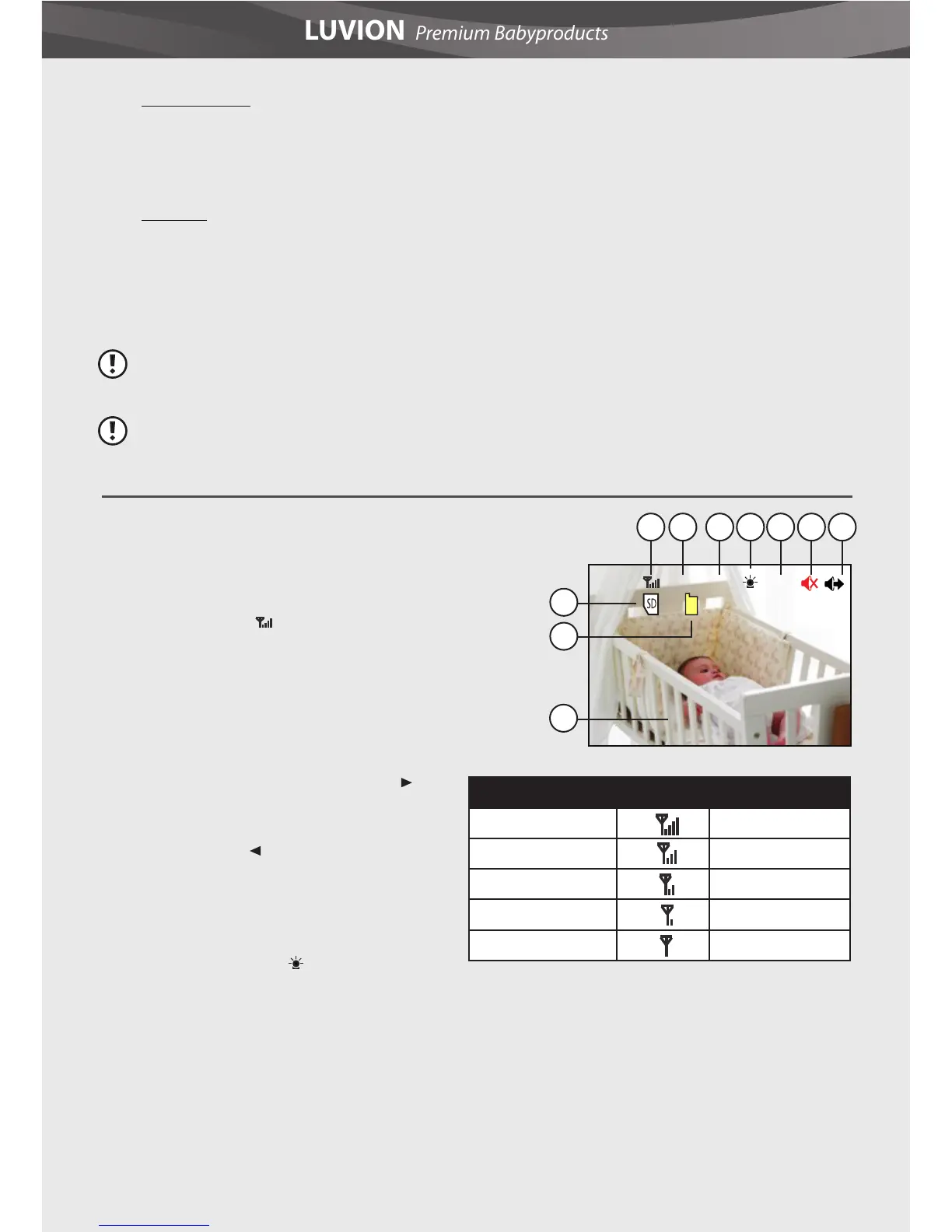
1. Signal indicator
The signal indicator
shows the strength of the signal being
recieved from the baby unit. One or no bars
indicate a poor signal and 4 bars indicate a
strong signal.
2. Channel indicator The channel indicator
displays the current channel. Press the
button to switch between the available baby
units. To automatically switch between the
channels press the
button.
3. Temperature indicator Displays the
temperature measured by the baby unit.
4. Nightlight indicator
The nightlight
indicator is displayed when the nightlight on
the baby unit is turned on.
5. Overwrite OW indicator When you have
selected “yes” for the overwrite function. The
letters OW will be displayed on the screen.
10
8
9
1 2 3 4 5 6 7
Cam1
BRAHMS
25°C
OW













 To Next Page