EasyManua.ls Logo

Luvion Platinum - User Manual

Luvion Platinum
13 pages
Print Icon
To Next Page IconTo Next Page
Loading...
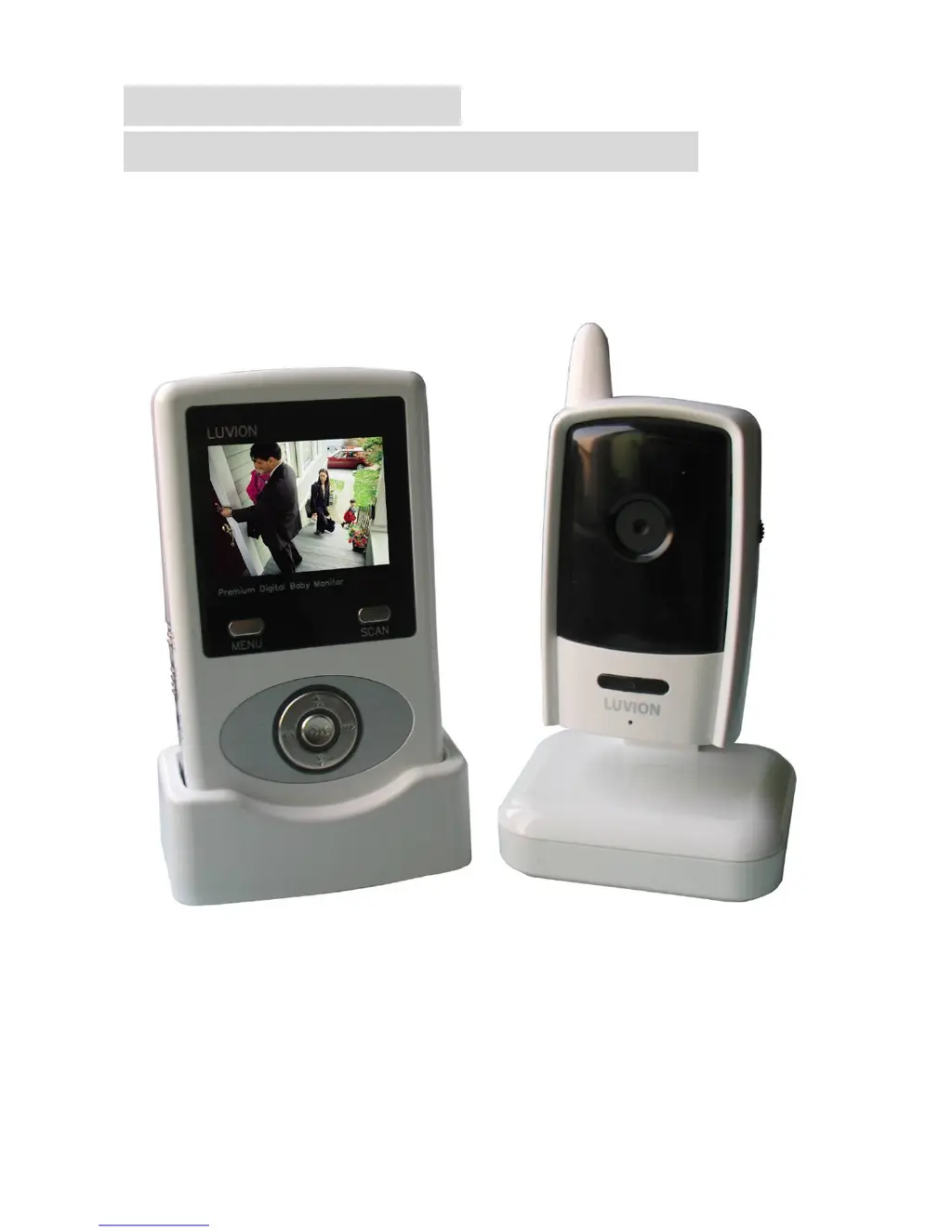
PORTABLE DIGITAL
WIRELESS MONITORING SYSTEM
INSTRUCTION MANUAL
MODEL: Luvion Platinum

Questions and Answers

  • P
    paula63Aug 15, 2025
    How to fix Luvion Platinum if there is no picture from camera?
    • B
      brendamartinezAug 16, 2025
      If you're not getting a picture from your Luvion Baby Monitor camera, here are a few things to try: 1. Check that all connections to the camera are secure and the adapter is plugged in properly. 2. Ensure both the camera and receiver are switched ON. 3. Verify that the camera is within the receiver's range. 4. If you're using a battery adapter, try replacing the batteries.
  • S
    Stephen MarshallAug 19, 2025
    What to do if Luvion Platinum picture is dropping?
    • A
      Adriana BanksAug 19, 2025
      If the picture on your Luvion Baby Monitor keeps dropping, here's what you can do: 1. Try moving the camera closer to the receiver. 2. Reposition the camera, the receiver, or both to improve reception. 3. Make sure the monitor antenna is in a vertical position.
  • D
    Dylan JordanAug 21, 2025
    Why is Luvion Platinum picture choppy?
    • D
      Danielle BellAug 22, 2025
      If the picture on your Luvion Baby Monitor is choppy, try these steps: 1. Move the camera closer to the receiver. 2. Remove any obstructions that might be between the receiver and the camera. 3. Adjust the monitor antenna to a vertical position.
  • B
    brucebrownAug 25, 2025
    How to troubleshoot audio problems on Luvion Platinum?
    • B
      Brian SpenceAug 25, 2025
      If you're experiencing audio problems with your Luvion Baby Monitor, here are a few things to check: 1. Make sure the volume on your TV is turned up. 2. Ensure there is sound within range of the camera's microphone. 3. If you hear a loud screeching noise (feedback), move the camera and receiver farther apart.
  • D
    David Robertson DDSAug 27, 2025
    Why does Luvion Platinum Baby Monitor picture appear grainy on large screen?
    • C
      Chad GainesAug 27, 2025
      The AV output on your Luvion Baby Monitor is primarily for convenience. When viewing on a large screen TV/monitor, the picture may appear grainy because the camera's video resolution is limited to VGA (640x480 pixels). This is not a defect. For better performance: 1. Use the PIP (Picture in Picture) function on your TV/monitor, if available. Check your TV/monitor's manual for instructions. 2. Try viewing the video on a smaller screen TV/monitor.
  • S
    Sabrina BradleyAug 31, 2025
    What to do if there is no picture from Luvion Measuring Instruments camera?
    • C
      Cynthia CarterAug 31, 2025
      If you're not getting a picture from your Luvion Measuring Instruments camera, here are a few things to check: * First, verify all connections to the camera and ensure the adapter is properly plugged in. * Next, confirm that both the cameras and the receiver are switched ON. * Also, make sure the camera is within the receiver's operational range. * If you're using a battery adapter, try replacing the batteries.
  • J
    johnsonjasonSep 2, 2025
    Why is the picture dropping on my Luvion Measuring Instruments?
    • C
      ccalderonSep 3, 2025
      If the picture quality is dropping on your Luvion Measuring Instruments, consider these solutions: * Try moving the camera closer to the receiver. * Repositioning either the camera or the receiver may also improve reception. * Additionally, make sure the monitor antenna is in a vertical position.
  • R
    Robert DavisSep 6, 2025
    What to do if the picture is or has become choppy on Luvion Measuring Instruments?
    • D
      Dr. Catherine Neal DDSSep 6, 2025
      If the picture on your Luvion Measuring Instruments is choppy, here are a few things you can try: 1. Move the camera closer to the receiver. 2. Remove any obstructions that might be between the receiver and the camera. 3. Adjust the monitor antenna to a vertical position.
  • K
    Kelly ReyesSep 8, 2025
    How to troubleshoot audio problems with Luvion Measuring Instruments?
    • T
      Tammy JohnsonSep 8, 2025
      Experiencing audio issues with your Luvion Measuring Instruments? Here's what you can do: * First, check that the volume on your TV is turned up. * Ensure that there is sound within the range of the camera's microphone. * If you hear a loud screeching noise (feedback), try moving the camera or receiver farther apart.
  • C
    Carol HaynesSep 12, 2025
    Why does the picture appear grainy when using AV out function on Luvion Measuring Instruments?
    • E
      Edwin GonzalezSep 12, 2025
      The AV output is primarily for convenience. When using a large screen TV/Monitor, the picture might appear grainy because the camera limits video resolution to VGA (640x480 pixels). For optimal viewing, use the TV/Monitor's PIP (Picture in Picture) function, if available. Alternatively, view the video on a smaller screen TV/Monitor.

Summary

Wireless Receiver Controls

Front;Back Controls Overview

Details the buttons and displays on the front and back of the receiver unit.

Wireless Receiver Connections

Wireless Receiver Installation

Setup Procedure

Step-by-step guide for installing and setting up the receiver.

Wireless Camera Controls and Installation

Camera Installation Guidance

Provides advice on camera placement, night vision, and mounting.

Viewing Mode and Menu System Access

Menu System Operations

Pairing Menu Details

Instructions and options for pairing cameras with the receiver.

A;V Out and Camera Pairing Procedures

Camera Pairing Steps

Step-by-step guide for pairing additional cameras.

Troubleshooting Common Issues

Problem Resolution Guide

Solutions for common problems like no picture, audio, or choppy video.

Luvion Platinum Specifications

General IconGeneral
Night VisionYes
Two-Way AudioYes
Temperature SensorYes
TypeDigital
Temperature DisplayYes
Number of Cameras1
Battery Life10 hours

Related product manuals