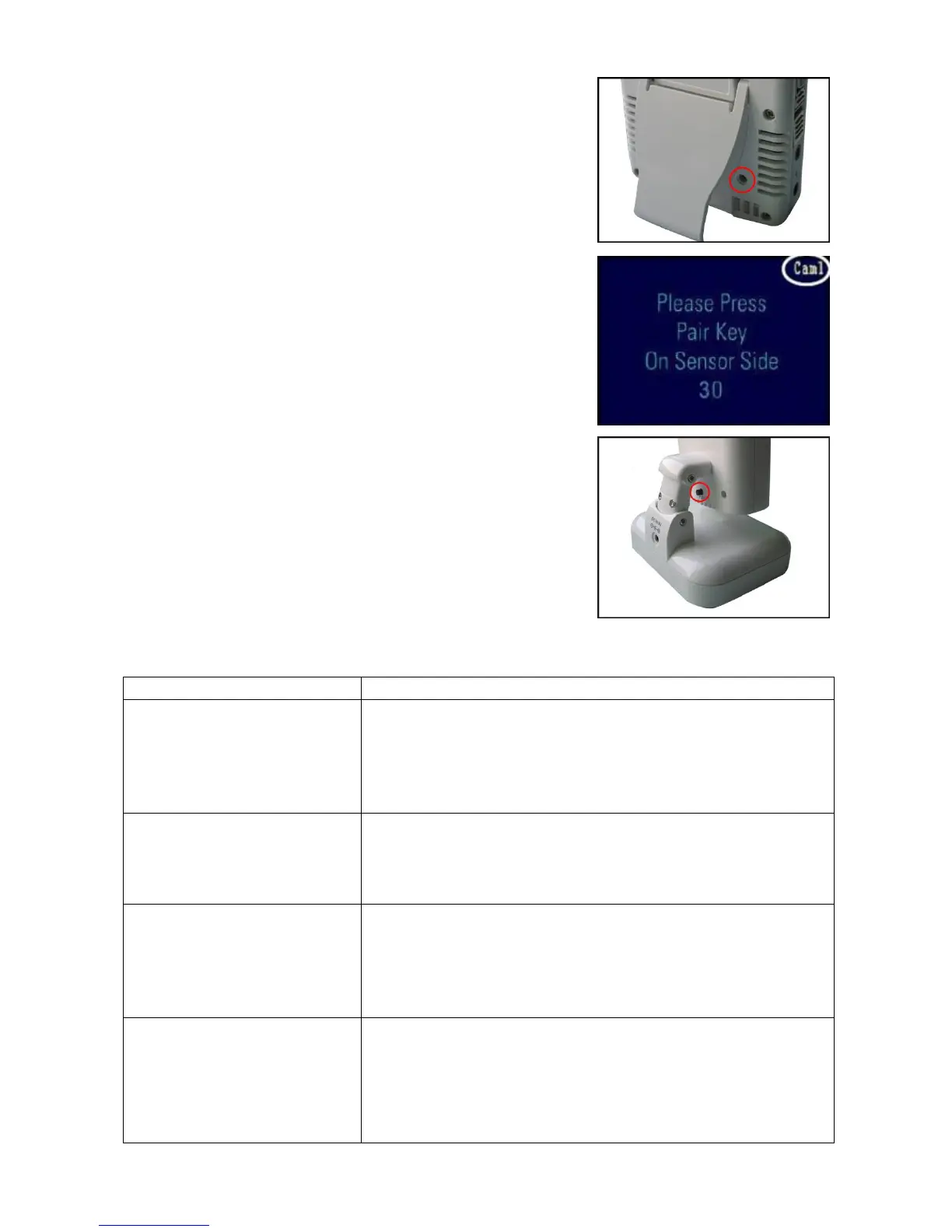
5. Press the Pair button located on the bottom of the receiver using
a pen tip or paperclip.
6. A message will be displayed on the receiver screen.
The receiver will count down from 30~0 – you must press the Pair
button on the camera during this time to successfully pair the
camera.
If the button on the camera is not pressed, the receiver will return to
the view screen, and no pairing will take place.
7. Press the Pair button on the back of the camera.
Once the camera has been paired, it will be immediately viewable
on the receiver monitor.
Troubleshooting
If you have problems with the system, there is often a quick and simple solution. Please try the following:
Problem Solution
No picture from a camera
1. Check all connections to the camera. Make sure the adaptor is
plugged in.
2. Make sure that the cameras and receiver are both ON.
3. Make sure that the camera is in range of the receiver.
4. If using the battery adaptor, try replacing the batteries
The picture is dropping
1. Move the camera closer to the receiver.
2. Try repositioning the camera, receiver or both to improve the
reception.
3. Adjust the monitor antenna to vertical position.
Audio problems
1. Ensure that the volume on the TV is on.
2. Make sure that there is sound within range of the camera
microphone
3. If the unit emits a loud screeching noise (feedback), move the
camera or receiver farther apart.
The picture is or has become
choppy
The picture may become choppy when experiencing a lower frame
rate (i.e. 10 frames per second vs. a higher 20 frames per second).
1. Try moving the camera closer to the receiver.
2. Remove obstructions between the receiver and camera.
3. Adjust the monitor antenna to vertical position.
10














 To Next Page