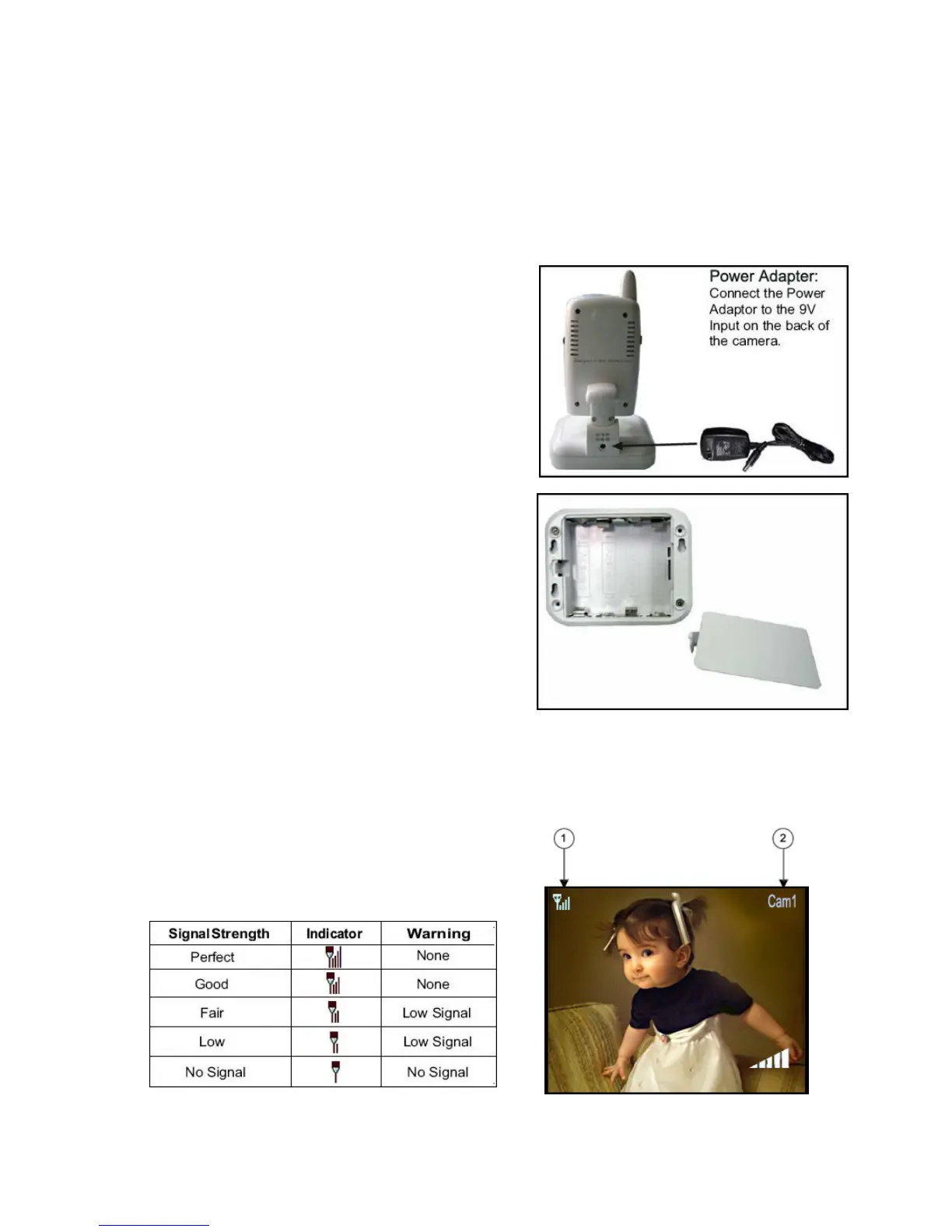
Connecting Camera Power
The camera can be powered either by using the provided power adaptor, or using batteries (requires 4
AA type batteries, not included).
NOTE: Wireless cameras require a power source (either an electrical outlet or battery power) to operate.
If you plan to permanently mount the camera in a location, it is recommended to use the included
camera power adaptor to prevent interruptions in the image, as using battery power is intended as a
temporary power solution.
6
Battery Pack
1. Remove the battery cover off the base of the camera.
teries (not included) into the Battery Pack.
e up the Positive (+) and negative
d in with the AC adaptor, the
batteries will not be used. The batteries are intended for
1. Signal Indicator – The signal indicator shows the strength of the signal being received from the
of bars in the signal indicator shows the strength of the signal – One or No Bars
Power Adaptor
Connect the power adaptor to the camera. Make sure the
power adaptor is placed into a grounded outlet or surge bar
to protect the camera from power fluctuations.
2. Insert 4 AA bat
Make sure to correctly lin
(-) terminals of the batteries.
3. Place the battery pack cover back on.
NOTE: If the camera is plugge
short term, portable camera use only.
Viewing Mode
camera. The number
indicates the signal is poor, and 4 bars indicate a very strong
signal.
Signal Indicators:














 To Next Page