Need help?
Do you have a question about the LUX KONO and is the answer not in the manual?
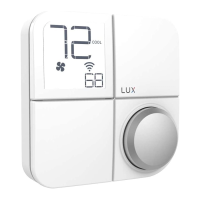
Explains how to use the KONO thermostat's knob to navigate menus and select options.
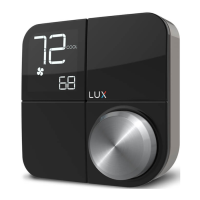
Displays the current ambient room temperature on the thermostat screen.
Shows the desired temperature setting for heating or cooling.
Indicates the current operating mode of the HVAC system (e.g., HEAT, COOL).
Shows if the fan is running based on the selected fan mode (AUTO, ON, IAQ).
Indicates when the HVAC system is actively heating or cooling.
Accesses menu to set HVAC system mode (OFF, HEAT, COOL, AUTO).
Accesses menu to set fan mode (AUTO, ON, IAQ) and check filter life.
Opens menu to select schedule or hold constant temperature. Requires app connection.
Allows adjustment of advanced preferences and installation settings.
Menu to connect, disconnect, or temporarily disable WiFi connection.
Shows when the HVAC system is preparing to turn on or off.
Recommends AUTO mode for mild seasons or mixed heating/cooling needs. Suggests IAQ fan mode.
Recommends HEAT mode for cold weather, keeping the heater active above set temperature.
Recommends COOL mode for hot weather, keeping the AC active below set temperature.
Allows pausing the schedule for a set duration, e.g., for a party.
Enables holding a specific temperature indefinitely until cancelled.
 General
| Connectivity | Wi-Fi |
|---|---|
| Type | Smart Thermostat |
| Programmability | 7-day programmable |
| Hold Feature | Yes |
| Filter Change Alert | Yes |
| Power Source | Hardwired or C-wire |
| Display Type | LCD |
| Features | Energy reports |
| Temperature Range | 45°F to 90°F |
| Battery Life | Not applicable (C-wire or Power Bridge required) |

 To Next Page