LuxProducts.com | 13
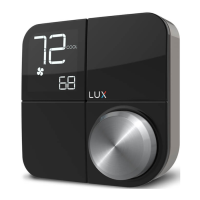
3.2 Reading KONOzw’s screen
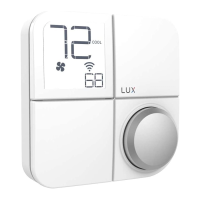
The large number in
the top le shows
your ambient room
temperature.
The small number in the
boom right shows your
set temperature.
The selected system
mode (HEAT, COOL or
OFF) is shown to the right
of the ambient room
temperature.
The acve fan status
is shown by the icon
below the ambient
room temperature. If
it is o, your fan is not
running. If it is on, your
fan is running. Please
note that your fan will
run depending on your
selected fan mode (either
AUTO or ON).
If you see ON under
your system mode, it
means that your system
is acvely heang or
cooling your home.
This icon indicates the
baery levels of the
KONOzw.
Note: Replace all four AA
baeries in the KONOzw
if the low baery icon or
blinking empty baery icon
appears on your KONOzw.
OPERATIONS GUIDE
3. OPERATIONS
This icon shows that
your HVAC system is
preparing to turn on
or o. Please wait for
heang and cooling
to start.


 To Next Page
 Loading...