View Luxul’s Privacy policy at:
https://www.legrandav.com/en/legal/privacy_policy
Copyright and Trademark Notices
No part of this document may be modied or adapted in any way, for any purposes without permis-
sion in writing from Luxul. The material in this document is subject to change without notice. Luxul
reserves the right to make changes to any product to improve reliability, function, or design. No license
is granted, either expressly or by implication or otherwise under any Luxul intellectual property rights.
An implied license only exists for equipment, circuits and subsystems contained in this or any Luxul
product.
© Copyright 2021 Legrand AV Inc. All rights reserved. The name Luxul, the Luxul logo, the Luxul logo
mark and Simply Connected are all trademarks and or registered trademarks of Legrand AV Inc.
All other trademarks and registered trademarks are property of their respective holders.
Sales
P: 801-822-5450
E: sales@luxul.com
Technical Support
P: 801-822-5450
E: support@luxul.com
For support chat go to: luxul.com
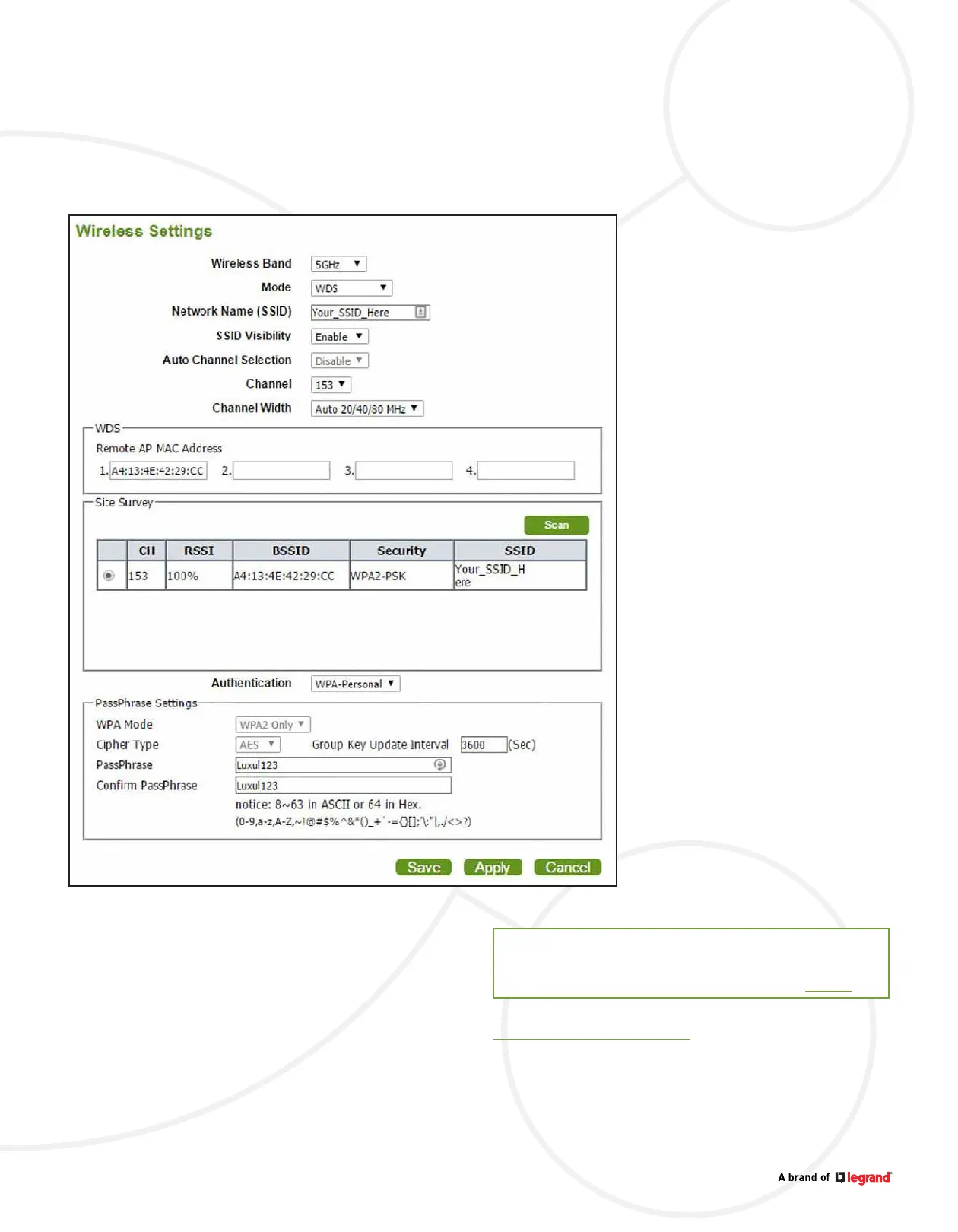
The REMOTE access point information should be retrieved. Select the button next
to the Channel setting and the REMOTE AP MAC Address should appear.
Select Save and then Apply at the bottom of the page.
TECH NOTE


 To Previous Page