P16MI417 - A02 - 01/16 27
|
POUR
L’INSTALLATEUR
FR
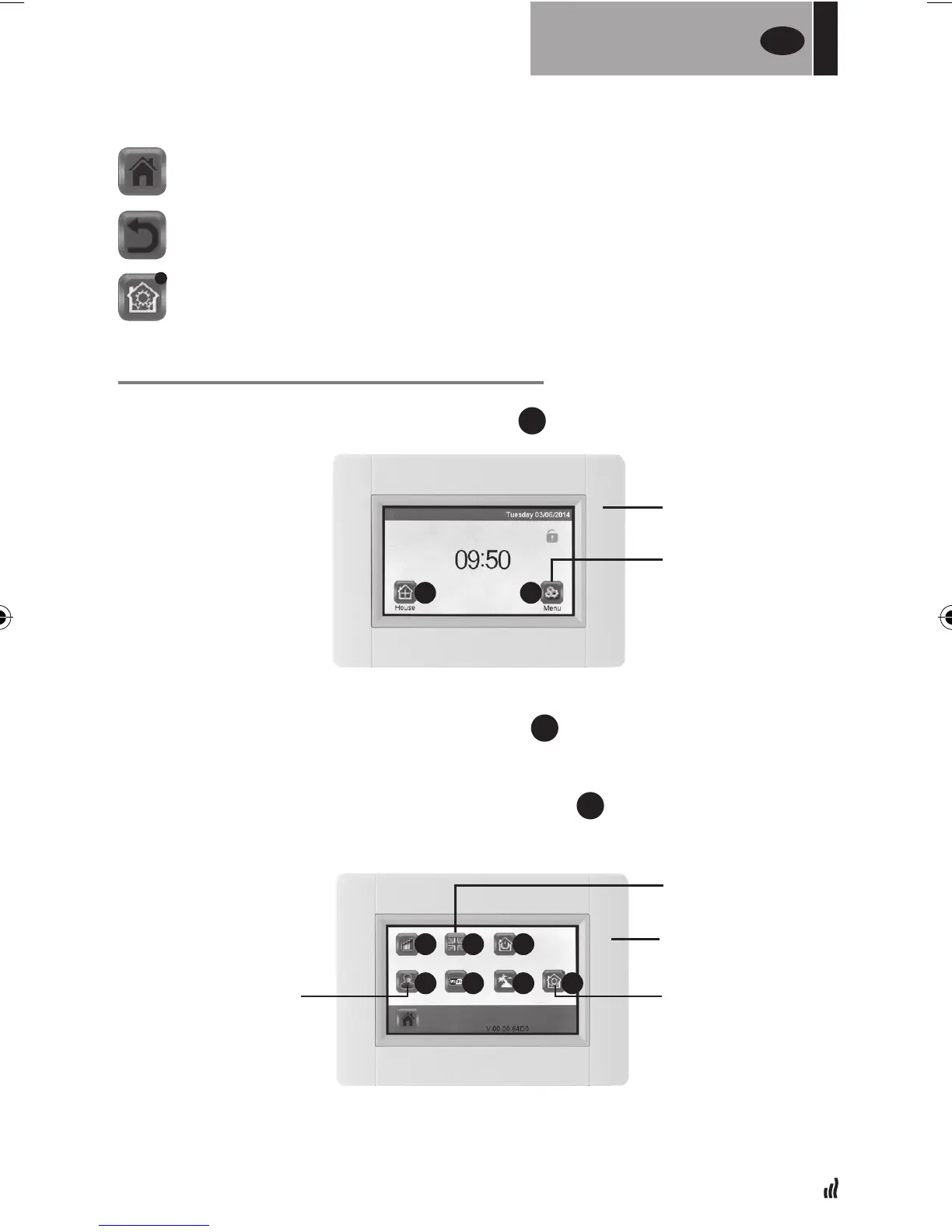
05. Principaux pictogrammes
DÉFINIR LA LANGUE, LA DATE ET L'HEURE
01. Appuyez sur le bouton « Menu principal »
A
02. Appuyez sur le bouton « Définir la langue »
D
•Ledrapeaucorrespondantàlalangueactuellementdénieestafché.
03. Appuyez sur le bouton « Paramètres utilisateur »
F
•Dénissezladateetl’heure
Revenir à « l’écran d’accueil »
Revenir à l’écran précédent
Les boutons avec un point rouge nécessitent une pression prolongée
BOUTON MENU
PRINCIPAL
ÉCRAN D'ACCUEIL
DÉFINIR LA LANGUE
PARAMÈTRES
UTILISATEUR
RÉGLAGE
DES PARAMÈTRES
A B
MENU PRINCIPAL
C
F
D
G
E
H I


 To Next Page