P16MI417 - A02 - 01/16 15
|
FOR
USERS
UK
FOR USERS
K
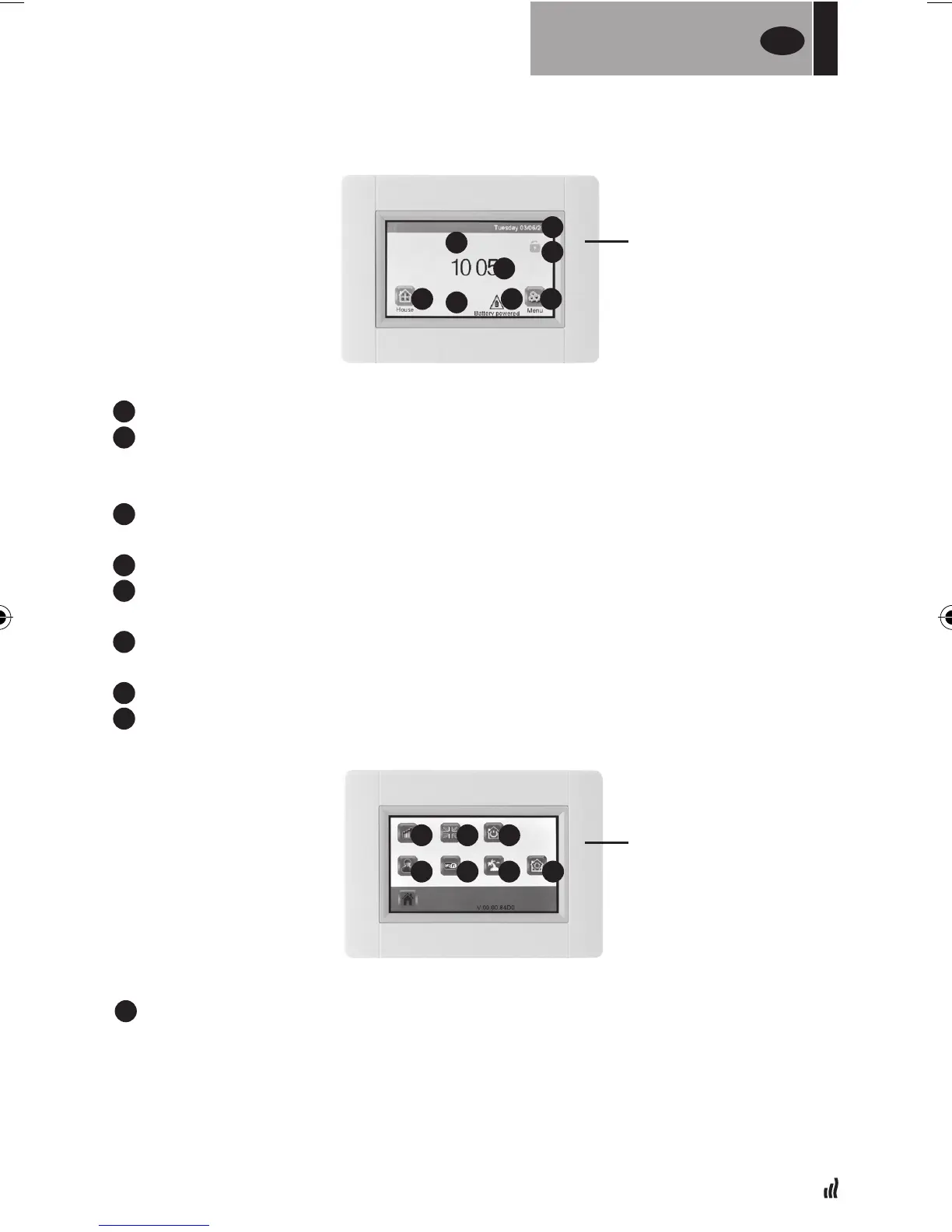
Day and date
L
Displays either time or temperature of a selected room. Change by pressing
temp/time value in the center of the screen and then choose which room's
temperature you want to display.
M
Screen lock. Press on the icon and enter the default code “1066” or enter the code
youhaveconguredinInstallationmenu>> Screen lock.
N
Error indicator, only visible when active. Access the list by pressing the icon.
O
Powered by battery, only visible when disconnected. Touch E3 should be
connected to a power supply during normal use.
B
House/Rooms access (only possible to view, not to change the settings when
the screen is locked)
P
Holiday mode, only visible when active.
A
To access “Main menu”
C
Consumption statistics menu
• Press “heating”
- Check current or previous consumption period for the whole installation or
by room, per day/week/month/year.
• To present the information graphically, press the “information button”
• To delete history, press the “trash can” button (long press).
K
L
M
N
OB A
P
START UP
SCREEN
MAIN MENU
C
F
D
G
E
H I


 To Next Page