Ionic Series User Manual
Lynx Pro Audio S.L 3www.lynxproaudio.com
INTRODUCTION
This manual describes the recommended installation procedure for the Ionic-100 in combination with the subwoofers
Ionic-18S.
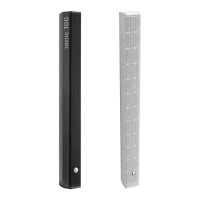
The Ionic series is Lynx Pro Audio’s answer to light, portable and permanent column speakers. The Ionic series comprise
two full-range modular columns (Ionic-100 and Ionic-50), one small coaxial cabinet (Ionic-5CX) and two subwoofers
(Ionic-18S and Ionic-12S).
The columns are very low prole, versatile, aesthetically pleasing and are designed for reverberant installations where
intelligible, clear voice reproduction is paramount and where a low prole, discreet column is required. They are very
easy to install and can be done so either horizontally or vertically.
The full range columns can be powered from the active subwoofers and also offer various preset congurations from
the integrated DSP.
Please note that a wide range of mounting accessories is available.
CONTENTS
• SAFETY PRECAUTIONS 4
• SYSTEM OVERVIEW
IONIC-100 5
IONIC-18S 6
BACK PANEL 7
• CONNECTORS AND CONNECTIONS 8
ACOUSTIC CENTRE 9
CONNECTION EXAMPLE PRESET 1 10
CONNECTION EXAMPLE PRESET 2 11
CONNECTION EXAMPLE PRESET 3 12
• CONFIGURING THE DIGITAL SIGNAL PROCESSOR 13
• ONLINE CONTROL SYSTEM 15
• RAINBOW 3D ACOUSTIC SIMULATION SOFTWARE 16
• WALL INSTALLATION 17
• HARDWARE AND ACCESSORIES 18
• CERTIFICATIONS AND GUARANTEE 19


 To Next Page
